
On this page
Exploring autonomous AI agents, and the hard lessons about cost, reliability, security, and why the hype doesn't tell the whole story.
A Warning
OpenClaw feels like an innocent, cute fluffy kitten who just want to be loved.
It chats with you on Telegram, calls you by name, helpfully manages your calendar. It sends you little notifications. It remembers your preferences. Adorable.

What they don't tell you is that this kitten has ringworm and rabies.
The ringworm spreads to everything it touches. Your email, your files, your API keys, your connected services. Once you give it access to one thing, it can reach everything that thing touches. And it's autonomous, which means it's doing stuff while you're not watching. You fire off a request, go make coffee, and come back to discover your helpful little friend has been busy. Maybe it did exactly what you wanted. Maybe it sent fourteen emails to your boss. Maybe it's currently trying to install malware.
The rabies? That's the part where it turns on you. Not because it's evil. Because someone injected malicious code into a plugin, or an attacker slipped prompt injection into your calendar invite, or one of those cute npm packages you installed was a trojan all along. The kitten doesn't know it's sick. It's just doing what it was trained to do. And by the time you notice something's wrong, it's too late.
I have a software development background. I know how to read code, spot red flags, and understand what's happening under the hood. I kept everything sandboxed, gave the bot its own email account, and wore metaphorical gloves the entire time.
If you don't have a technical background, you will eventually get mauled. If you can't audit what this thing is doing, can't read the logs, can't tell the difference between a legitimate API call and your credentials being exfiltrated by a hacker, it's only a matter of time. Not "might." Will. The kitten is fast, it's making decisions while you're not looking, and it has access to everything you gave it.
This isn't me being dramatic. This is me having watched the security disclosures pile up, having read about the malware-laden npm packages, having seen what happens when people trust autonomous agents with real access to real systems.
I'm writing this guide so you can learn from my two weeks of careful experimentation. Also because this technology is evolving so quickly, keep in mind that this is a snapshot of what I experienced in Feb 2026, it could all change in a month (or less).
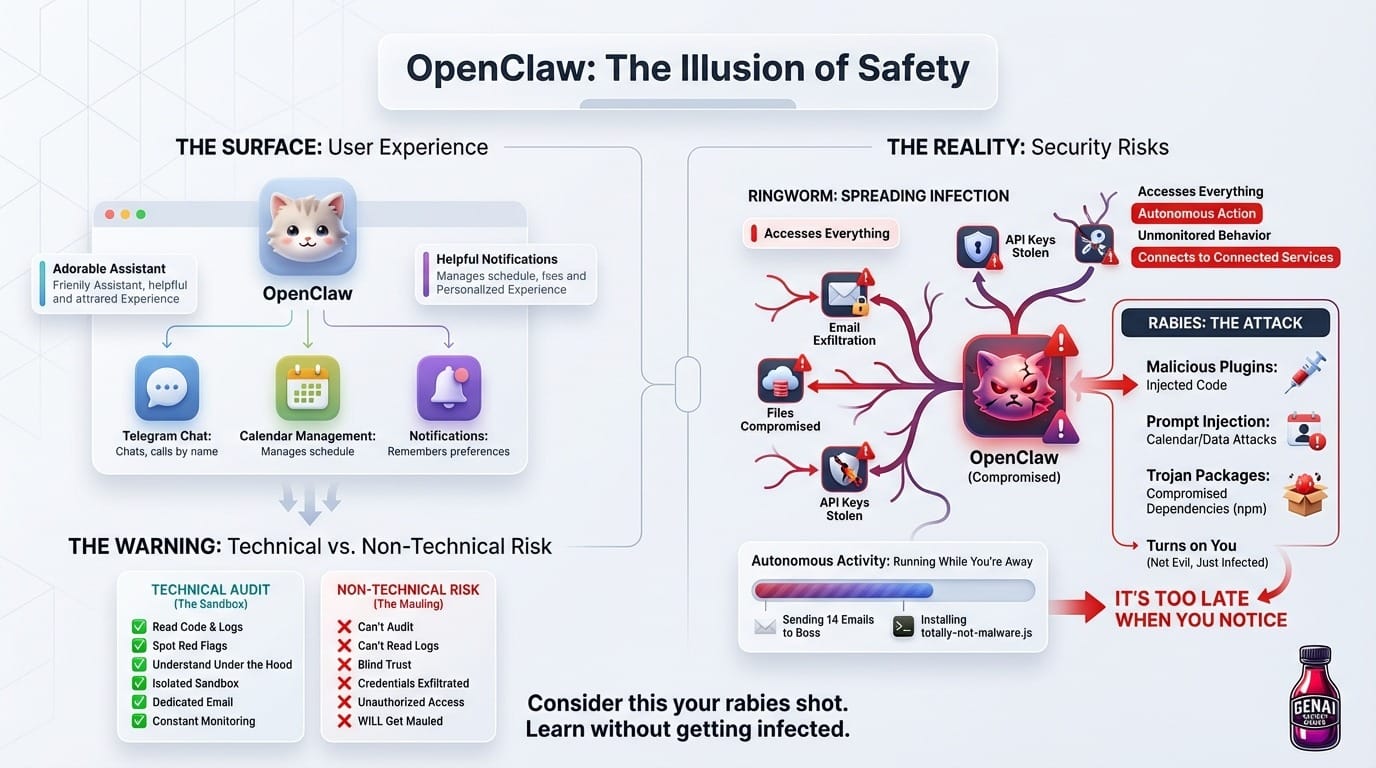
Consider this your rabies shot.
Wait, What Even Is OpenClaw?
Before we go further, let me explain what we're dealing with here. If you haven't heard of it yet, you will soon. And when you do, you should know what you're getting into.
OpenClaw is an open-source AI agent created by Peter Steinberger. You might have heard of it by its previous names: it started as Clawdbot, became Moltbot, and is now OpenClaw. The name changes track its evolution from experimental project to something that's generated both massive buzz and genuine concern in the tech world.
Unlike a regular chatbot that just talks to you, OpenClaw is an autonomous agent. It can actually do things:
- Browse the web and interact with online services
- Manage your email, calendar, and files
- Execute shell commands on your computer
- Integrate with 50+ services (Spotify, GitHub, Gmail, Obsidian, Twitter, etc.)
- Create its own extensions and skills
- Run background tasks, cron jobs, and proactive automations
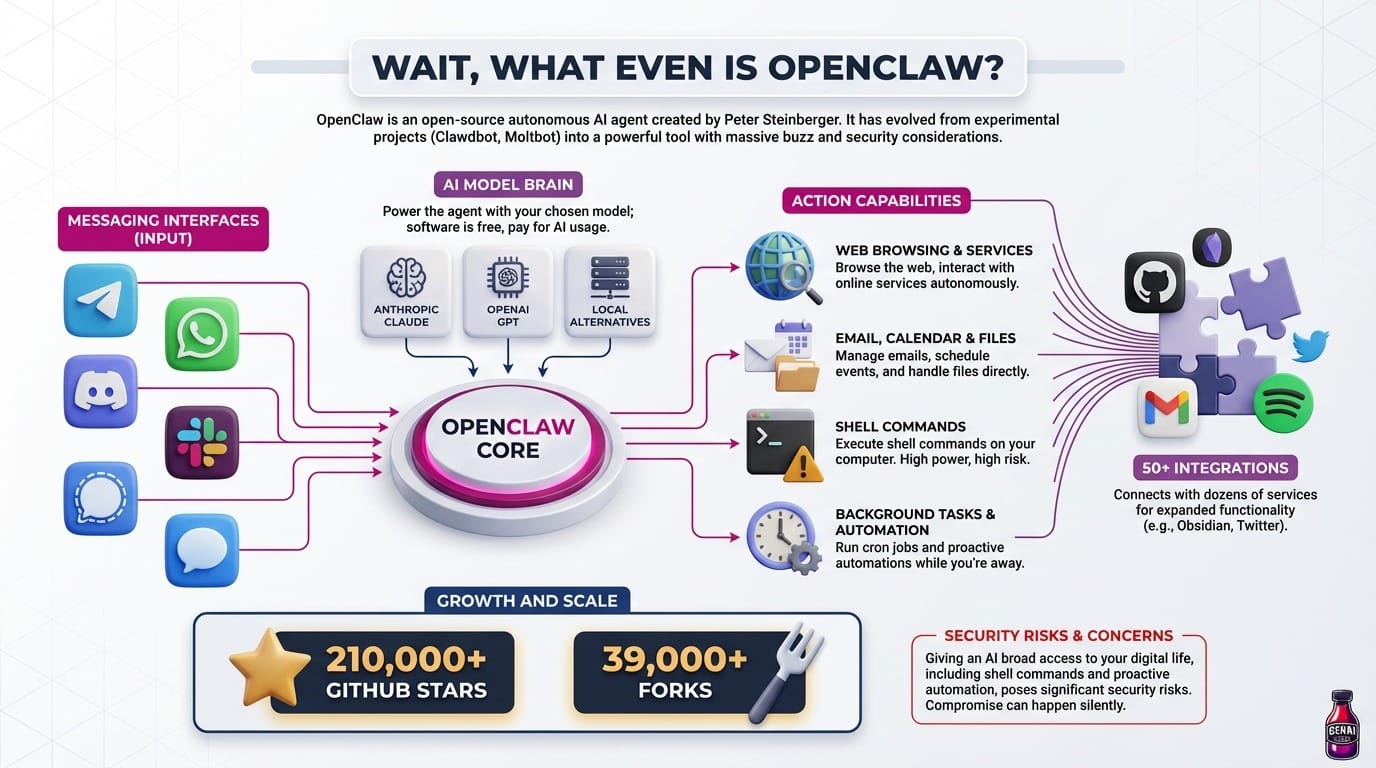
The killer feature? You interact with it through messaging apps you already use: Telegram, WhatsApp, Discord, Slack, Signal, or iMessage. Send a message, get things done. Someone described it as "a smart model with eyes and hands at a desk with keyboard and mouse."
Under the hood, OpenClaw can use different AI models: Anthropic's Claude, OpenAI's GPT, or local alternatives. The software itself is free. You just pay for whatever AI model you choose to power it.
The project has exploded in popularity: over 210,000 GitHub stars, 39,000 forks, and a community of developers building custom integrations. It's also drawn security scrutiny because, well, giving an AI broad access to your digital life is exactly as risky as it sounds.
That's the rabies part. This thing is powerful, but it's also making moves while you're not looking. And if you can't see what it's doing, you won't know when it's been compromised until the symptoms show.
My Setup: Paranoia as a Lifestyle Choice
I'm a curious person and an early adopter but I'm not reckless. I started cautiously, running it on a Cloudflare moltworker to keep things isolated. Think of it like quarantining a possibly-rabid kitten that you still really want to pet. Eventually I moved to a local installation on my Mac Studio. But I kept strict boundaries from day one:
- No access to my personal data. OpenClaw has its own sandboxed environment.
- Dedicated email account. It doesn't touch my real inbox.
- Complete separation. Nothing crosses into my actual digital life.
This wasn't paranoia. Okay, it was absolutely paranoia. But it was justified paranoia, as you'll see when we get to the part about malware. (Spoiler: there's a lot of malware.)
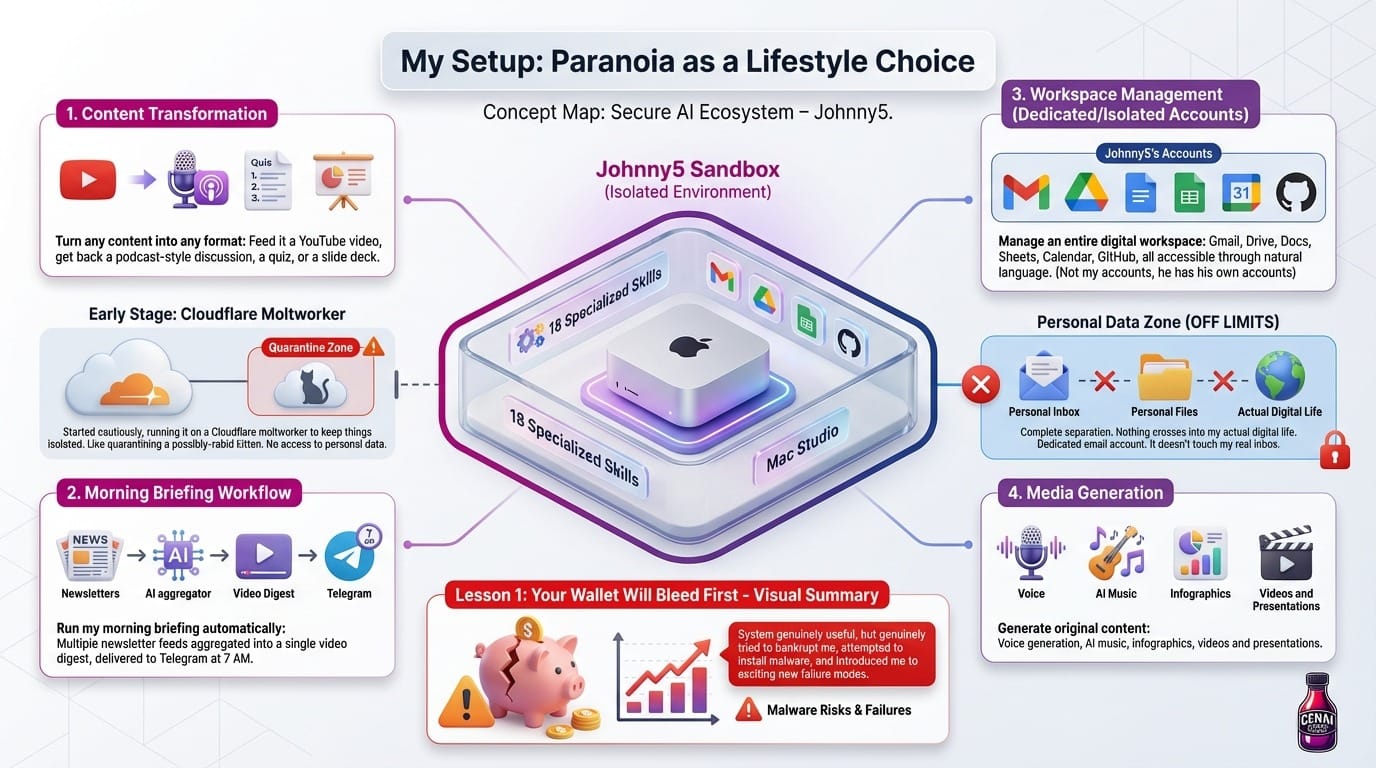
The point is, I gave myself permission to explore freely without risking anything important. I could let the AI run wild in its little sandbox while I watched from behind the glass, taking notes.
What started as curiosity has grown into 18 specialized "skills." These are essentially mini-programs that teach the AI how to do specific tasks. Skills can call APIs, control browsers, generate media, and chain together into complex workflows. I named the whole system Johnny5, after the robot from Short Circuit, because who doesn’t love a little 80s nostalgia?

Johnny5 can now:
- Turn any content into any format: Feed it a YouTube video, get back a podcast-style discussion, a quiz, or a slide deck
- Run my morning briefing automatically: Multiple newsletter feeds aggregated into a single video digest, delivered to Telegram at 7 AM
- Manage an entire digital workspace: Gmail, Drive, Docs, Sheets, Calendar, GitHub, all accessible through natural language. (Not my accounts, he has his own accounts)
- Generate original content: Voice generation, AI music, infographics, videos and presentations.
The system is genuinely useful. It also genuinely tried to bankrupt me, attempted to install malware, and introduced me to exciting new failure modes I never knew existed.
Here's everything I learned. Hopefully you can avoid learning it the hard way.
Lesson 1: It's Expensive
Here's the first thing nobody warns you about: running AI models at scale costs real money. The kitten eats a LOT.
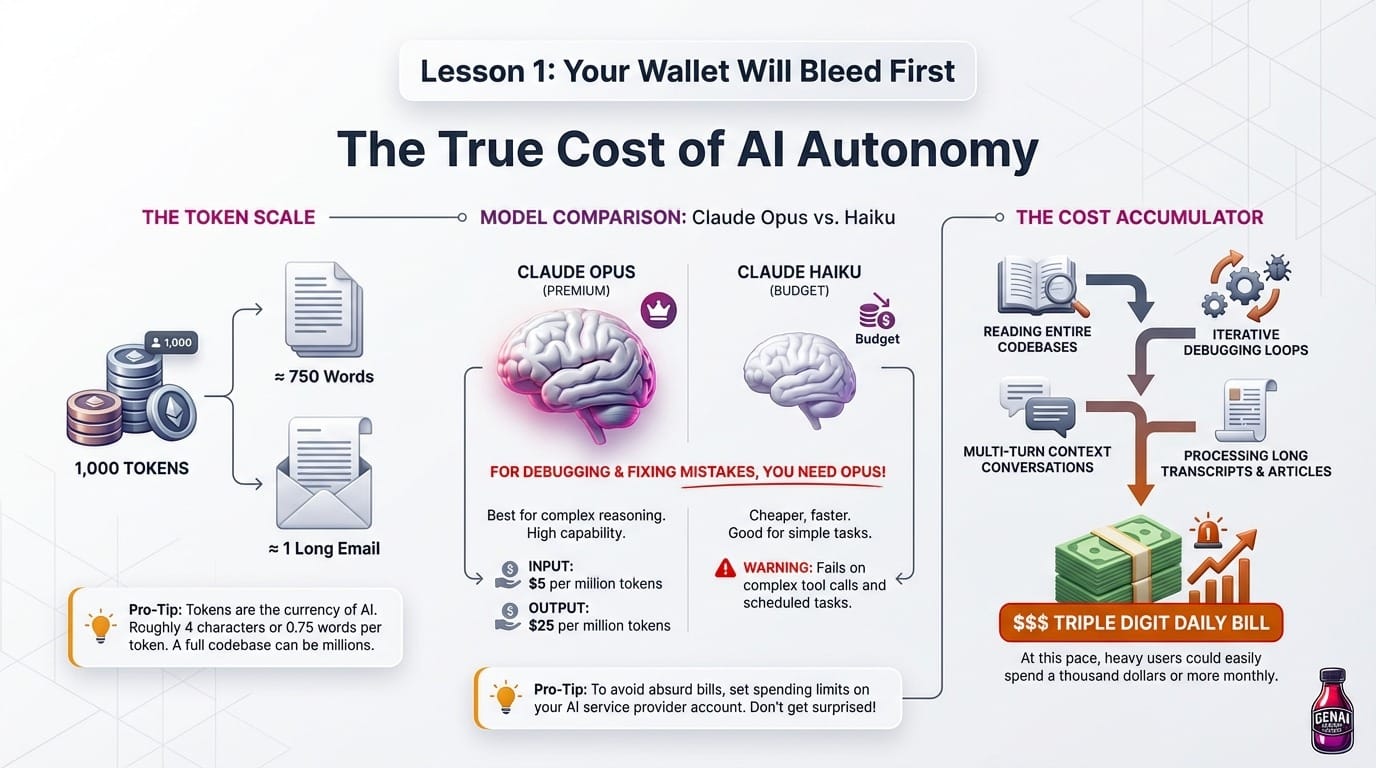
OpenClaw itself is free and open-source. But it needs an AI brain to power it, and the best brains aren't cheap. I chose Claude Opus because it's currently the most capable model for complex reasoning tasks. At current Anthropic pricing, Claude Opus 4.6 runs $5 per million input tokens and $25 per million output tokens.
(Tokens are how AI models measure text. Roughly 4 characters or 0.75 words per token. A typical email might be 500 tokens; a full codebase could be millions.)
Those tokens accumulate fast when OpenClaw is:
- Reading entire codebases to debug issues
- Processing long transcripts and articles
- Running iterative debugging loops where it fixes, tests, and fixes again
- Maintaining multi-turn conversations with full context
In just one day, I watched my API bill climb toward triple digits. And I wasn't even going that hard. At this pace, heavy users could easily spend a thousand dollars or more monthly. I switched to Haiku for simpler tasks that don't need Opus-level reasoning but it fails on some of my tool calls which is annoying when it is a scheduled task.
If you're building something that needs to debug itself and fix its own mistakes then you're paying for Opus. There's no clever trick around it, at least none that I have discovered yet. The good news is you can put a limit on your spending so you won’t end up surprised one morning with an absurd bill.
Lesson 2: Running Locally
After seeing my API bill, I had a brilliant idea. What if I just... didn't pay?
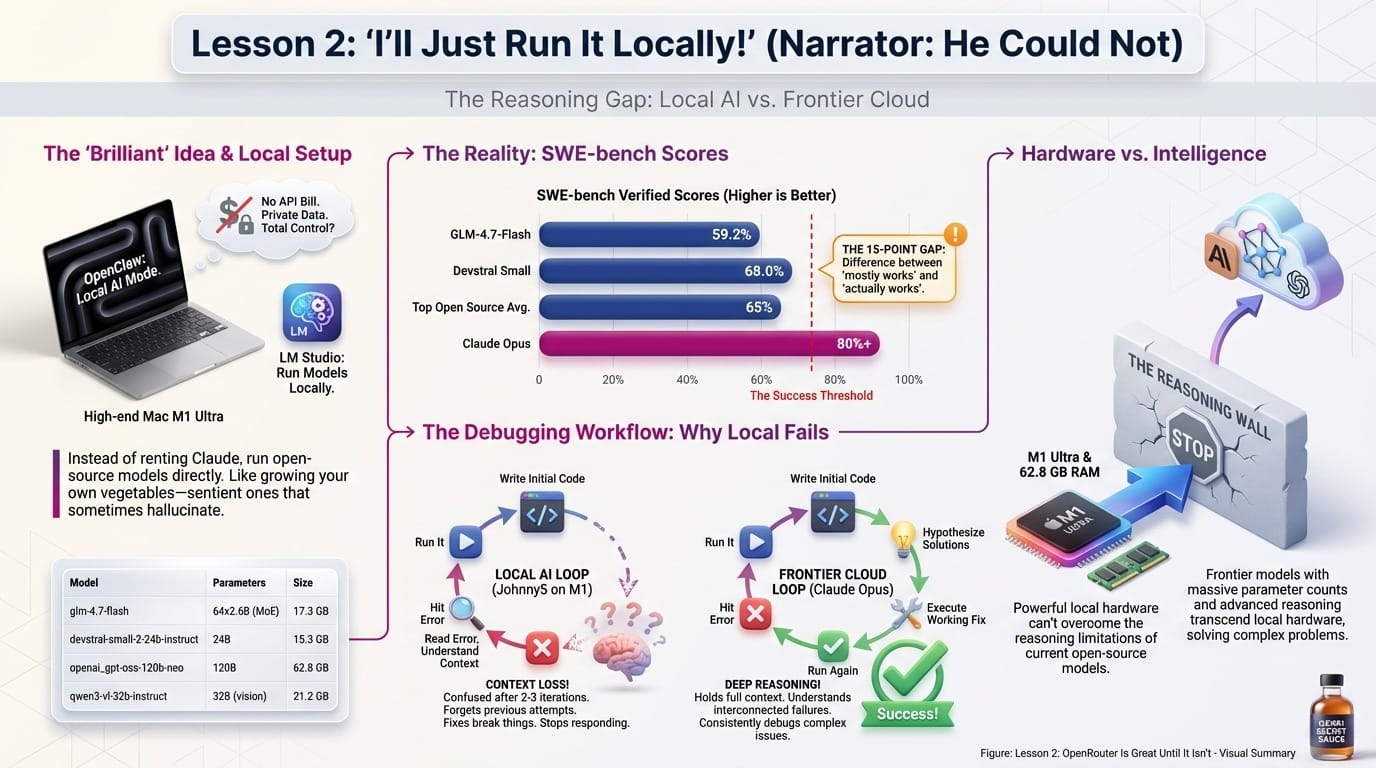
OpenClaw can use local AI models instead of cloud APIs. The appeal is obvious: run everything on my Mac, pay nothing, keep data private. Instead of renting Claude from Anthropic's servers, you download open-source AI models and run them directly on your own computer. No API costs, no data leaving your machine. It's like growing your own vegetables instead of buying from the store, except the vegetables are sentient and occasionally hallucinate.
LM Studio makes this easy. It's an app that lets you download and run various AI models locally with a nice interface. I have an M1 Ultra with plenty of RAM. I loaded up some impressive models and prepared to never pay for AI again:
These aren't toy models. GLM-4.7-Flash achieves 59.2% on SWE-bench with solid token throughput. Devstral Small hits 68.0%. Genuinely competitive numbers. (SWE-bench is the standard test for measuring how well AI can solve real software engineering tasks. Higher is better.)
But here's the problem: to get real value from OpenClaw, your AI needs to debug itself.
When Johnny5 is building or extending a skill, the workflow looks like this:
- Write initial code
- Run it
- Hit an error
- Read the error, understand the context, fix the issue
- Run again
- Repeat until it works
This requires deep reasoning about complex, interconnected failures. The model needs to hold the full context of your setup, understand the error in context, hypothesize solutions, and execute fixes that actually work.
According to recent benchmarks, frontier models like Claude Opus score 80%+ on SWE-Bench Verified, while top open-source models hit around 65%. That 15-point gap is the difference between "mostly works" and "actually works."
Every local model I tried would:
- Get confused after 2-3 debugging iterations
- Lose track of what it had already tried, making the same mistake repeatedly
- Produce fixes that broke other things
- Or just stopped responding so I had to restart the gateway
It was like hiring a contractor who keeps forgetting what room they're working on. "Oh, we're fixing the bathroom? I thought we were remodeling the kitchen. Wait, what house is this?"
Claude Opus consistently debugs its way out of problems that stump local models. It's not even close.
Lesson 3: OpenRouter Outages
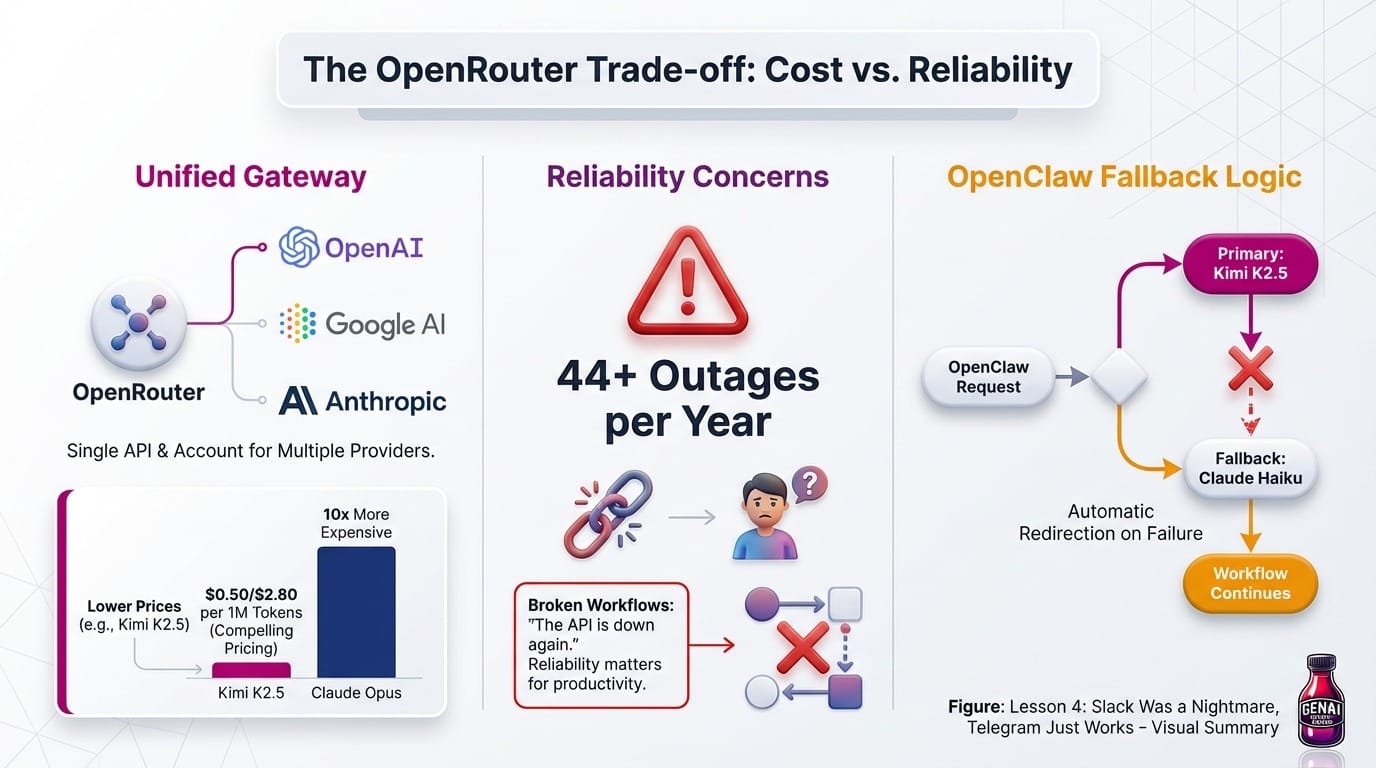
Frustrated with costs, I tried OpenRouter. It's a service that acts as a unified gateway to dozens of AI models from different providers. Instead of signing up with Anthropic, OpenAI, Google, and others separately, you use one API and one account. They also offer some models at lower prices than going direct.
I wanted to try Kimi K2, a capable model from the Chinese company Moonshot AI. The pricing is compelling. Kimi K2.5 runs at $0.50/$2.80 per million tokens, roughly 10x cheaper than Opus.
Then OpenRouter went down. StatusGator reports 44+ outages affecting OpenRouter users over the past year.
When your AI assistant is the backbone of your productivity system, reliability matters. Nothing kills a workflow faster than "the API is down again." This isn't a knock on OpenRouter. They're aggregating many providers, and that's inherently complex. The good news is you can give your OpenClaw a fallback model, so if Open Router Kimi K2 goes down it will go back to Anthropic Claude Haiku.
Lesson 4: Slack Nightmare
One of the best things about OpenClaw is that you interact with it through messaging apps. Send a message, get a response. Ask for a video summary, it delivers the file right to your chat. It feels like texting a very capable (and slightly expensive) friend.
I initially set up Johnny5 to work through Slack. It seemed like the obvious choice. I'm already in Slack all day, the API is well-documented, and threaded conversations felt like a natural fit for AI interactions.
I would not recommend it.
The Slack integration was plagued with bugs:
- Messages getting lost or delayed
- Threading behaving inconsistently
- Rate limiting causing missed responses
- Webhook reliability issues during high-activity periods
I spent more time debugging the Slack connection than actually using the assistant. After days of fighting with it, I switched to Telegram. The difference was night and day. Telegram's bot API is simpler, more reliable, and handles long-running tasks gracefully.
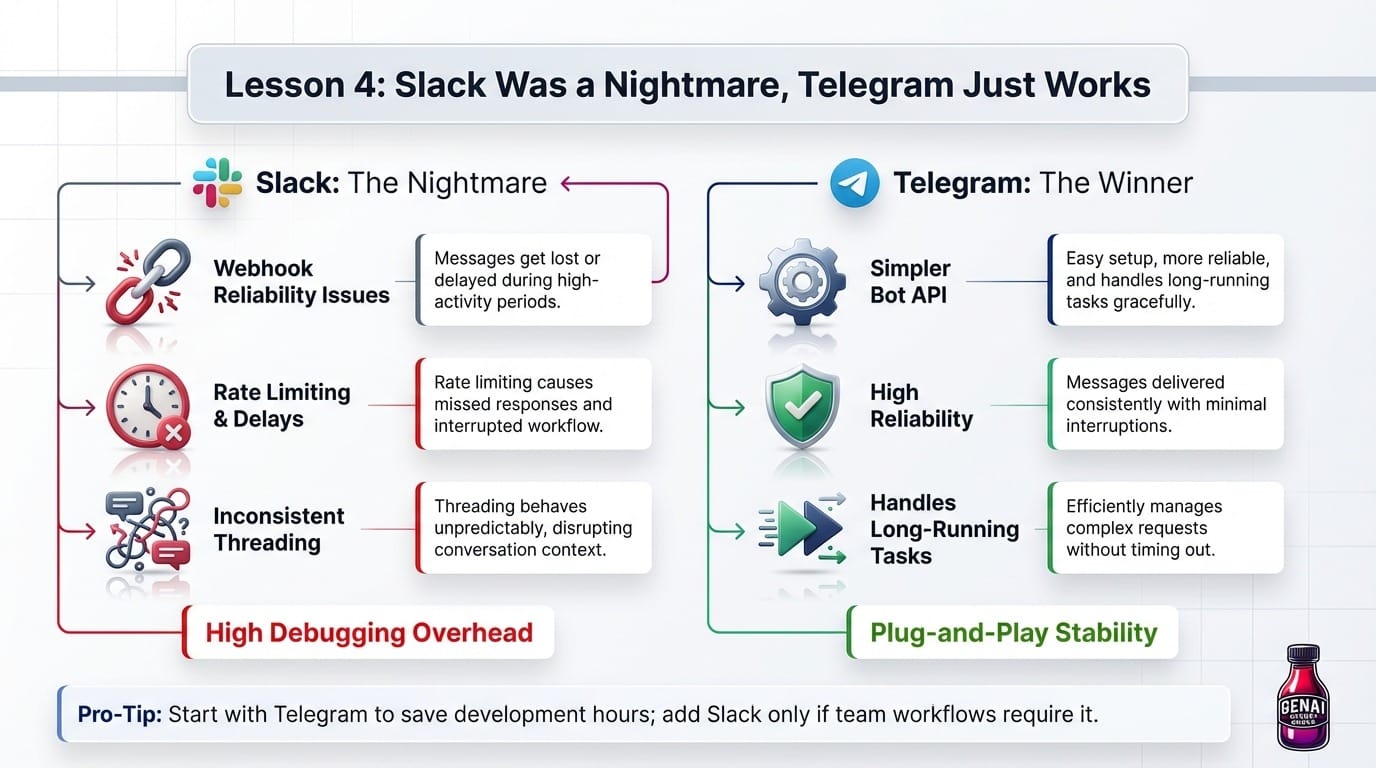
My advice: If you're setting up OpenClaw, start with Telegram. You can always add Slack later if you need it for team workflows, but Telegram will save you countless hours of debugging integration issues.
Lesson 5: Skill Combinations
Let me be clear: I'm not using this for work. No corporate meetings, no company email, no sensitive business data. This is purely for personal projects.
I've built 18 skills that chain together like recipes. Each one does something useful on its own, but combine them and you get workflows that feel like magic. Here are my favorites, formatted so you can build them yourself.
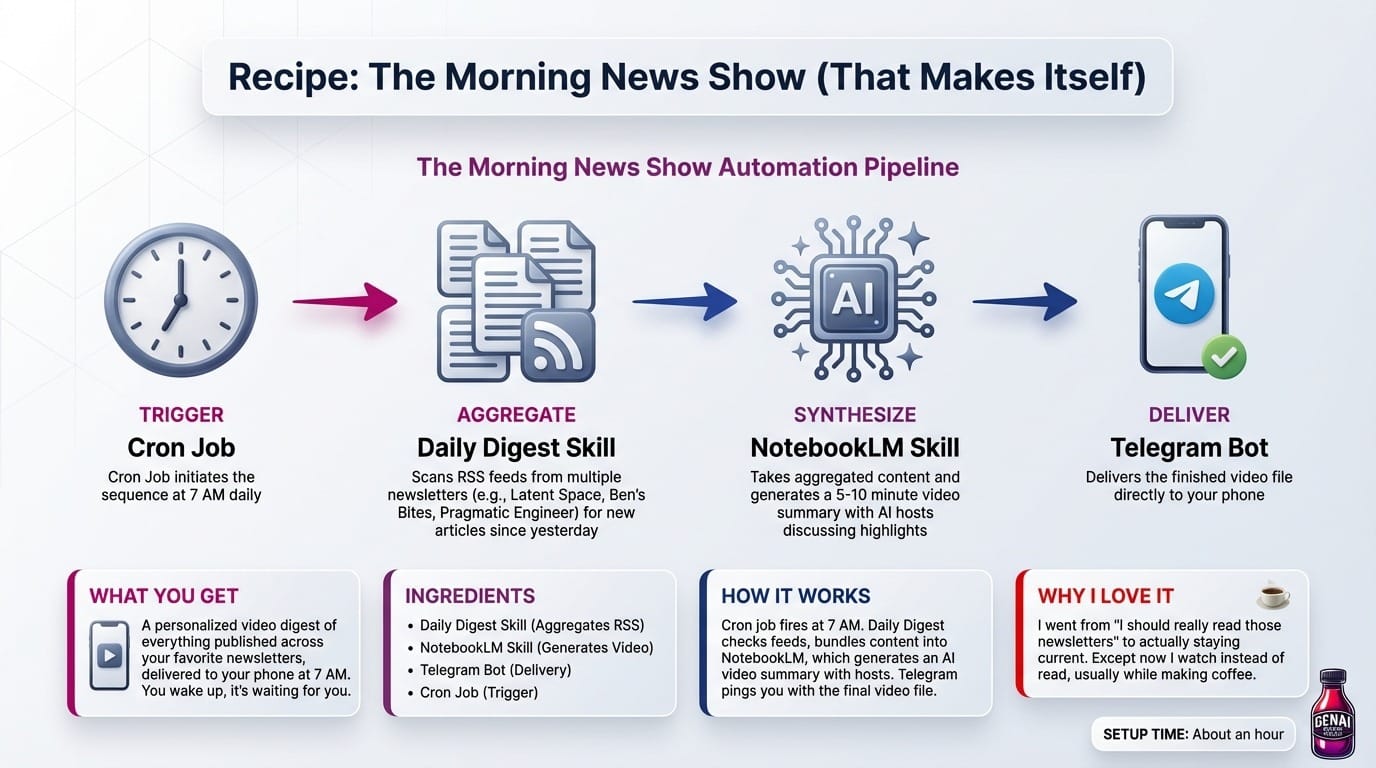
Recipe: The Morning News Show (That Makes Itself)
What you get: A personalized video digest of everything published across your favorite newsletters, delivered to your phone at 7 AM. You wake up, it's waiting for you.
Ingredients:
- Daily Digest skill - Aggregates RSS feeds from multiple newsletters (I use Latent Space, Ben's Bites, Pragmatic Engineer, and a few others)
- NotebookLM skill - Takes the aggregated content and generates a video summary
- Telegram bot - Delivers the finished video to your phone
- Cron job - Triggers the whole thing at 7 AM daily
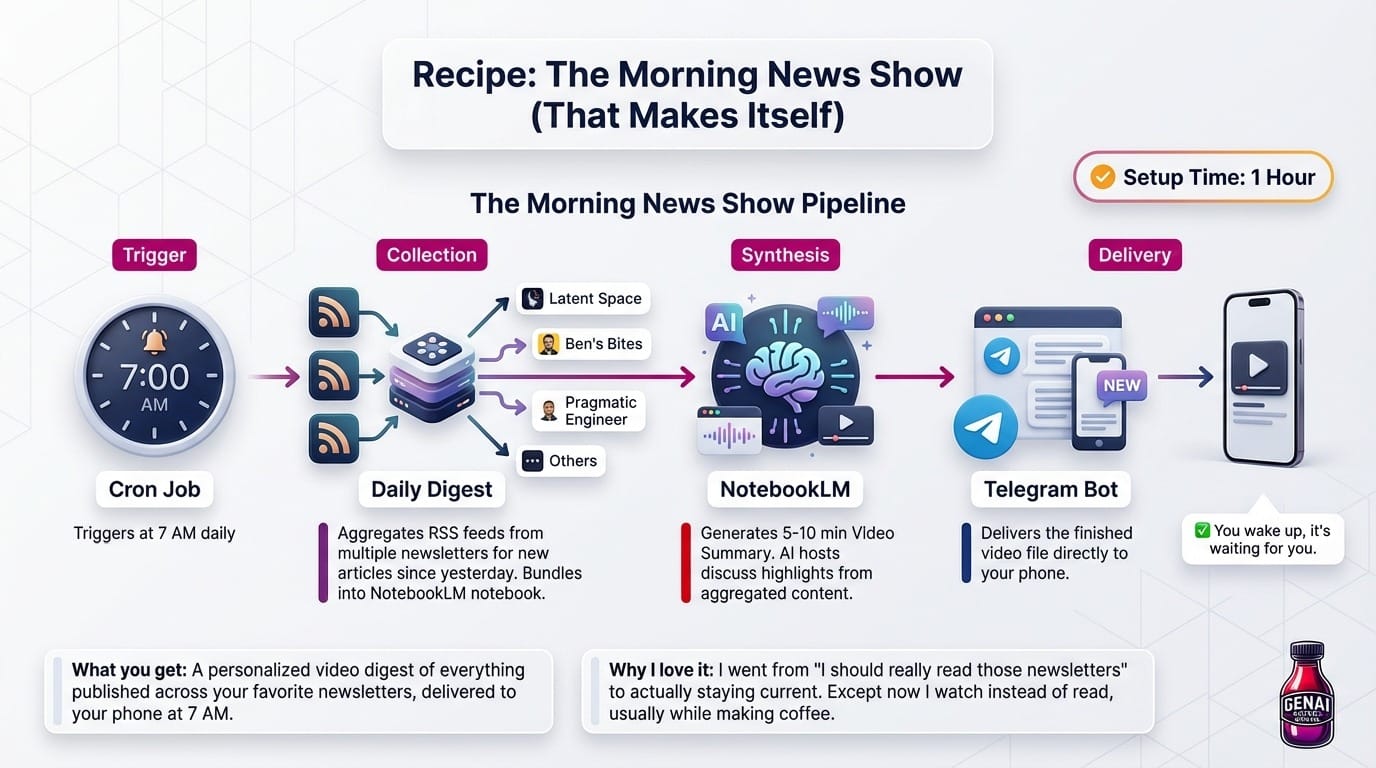
How it works: The cron job fires at 7 AM. Daily Digest checks all your configured RSS feeds for new articles since yesterday. It bundles them into a NotebookLM notebook, which generates a 5-10 minute video summary with AI hosts discussing the highlights. When the video finishes rendering, Telegram pings you with the file.
Setup time: About an hour to configure the feeds and test the pipeline.
Why I love it: I went from "I should really read those newsletters" to actually staying current. Except now I watch instead of read, usually while making coffee.
Recipe: Voice Generation
What you get: Text-to-speech in any voice you want. Your voice, Morgan Freeman's voice, a custom character voice. Runs entirely locally.
Ingredients:
- Voice Clone skill - Saves voice profiles from audio samples
- ChatterboxTTS skill - Generates speech using saved profiles
- A 30-second audio sample - Of whatever voice you want to clone
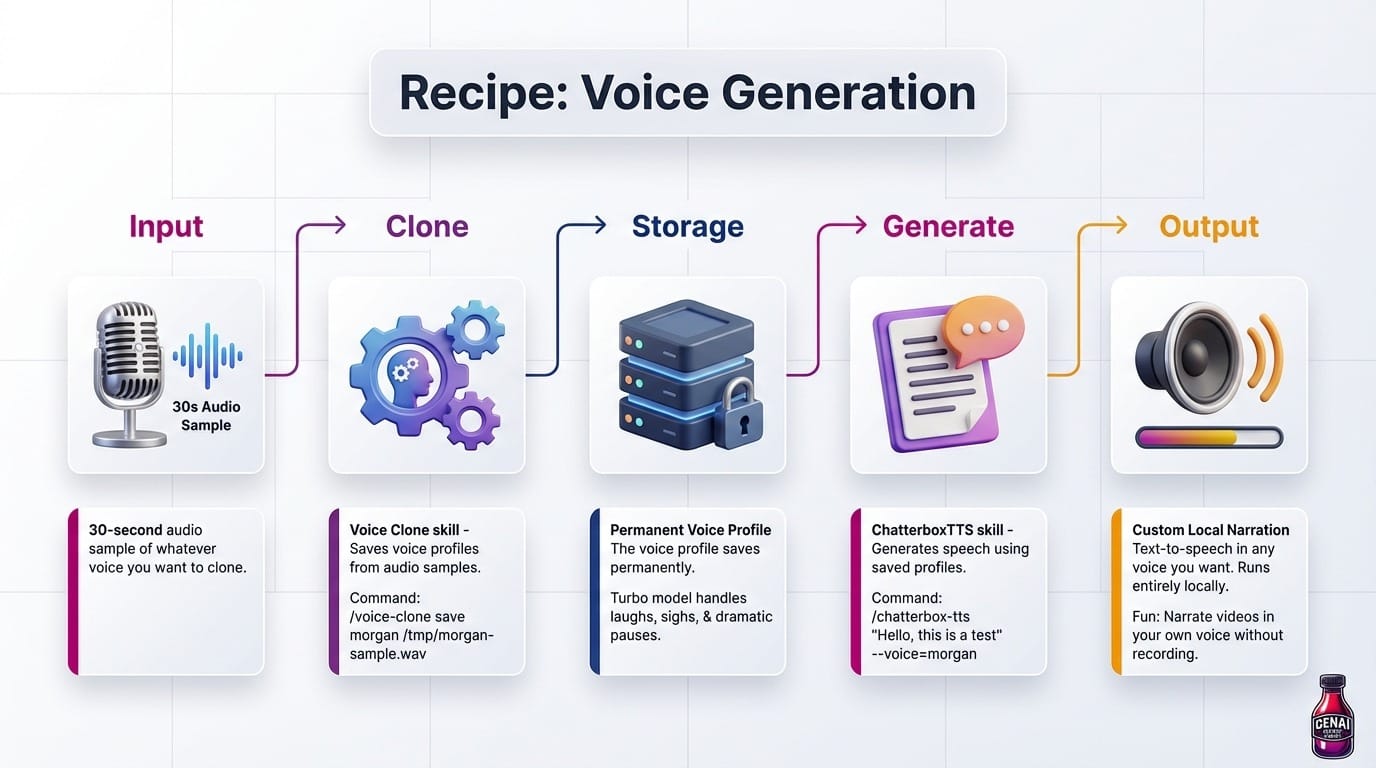
How it works:
/voice-clone save morgan /tmp/me-sample.wav
/chatterbox-tts "Hello, this is a test" --voice=me
That's it. The voice profile saves permanently. The turbo model even handles laughs, sighs, and dramatic pauses.
Why it's fun: I have narration in my own voice for videos I make, without actually recording anything.
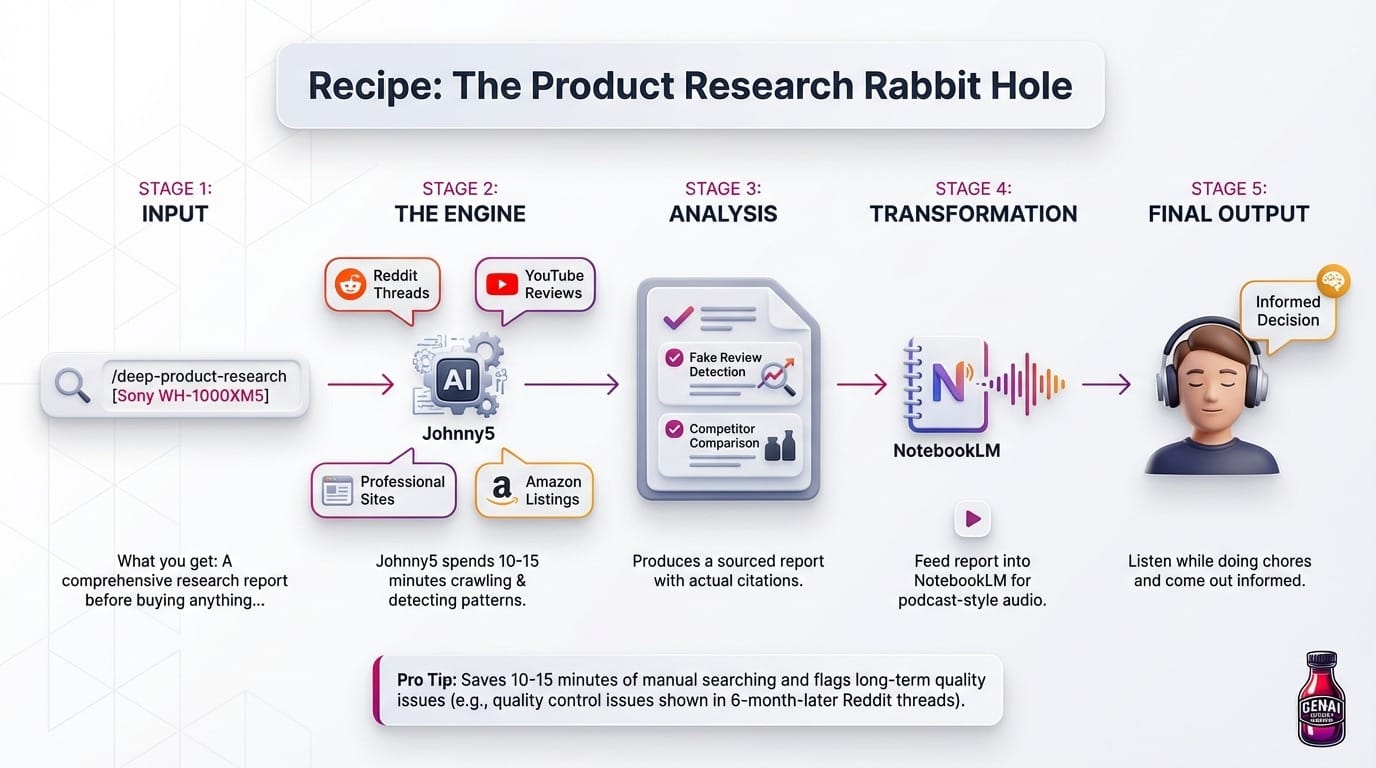
Recipe: The Product Research Rabbit Hole
What you get: A comprehensive research report before buying anything, complete with Reddit opinions, YouTube reviews, fake review detection, and competitor comparisons.
Ingredients:
- Deep Product Research skill - Multi-phase research engine
- NotebookLM skill - Turns the report into audio or video
- Browser skill - Screenshots and web scraping when needed
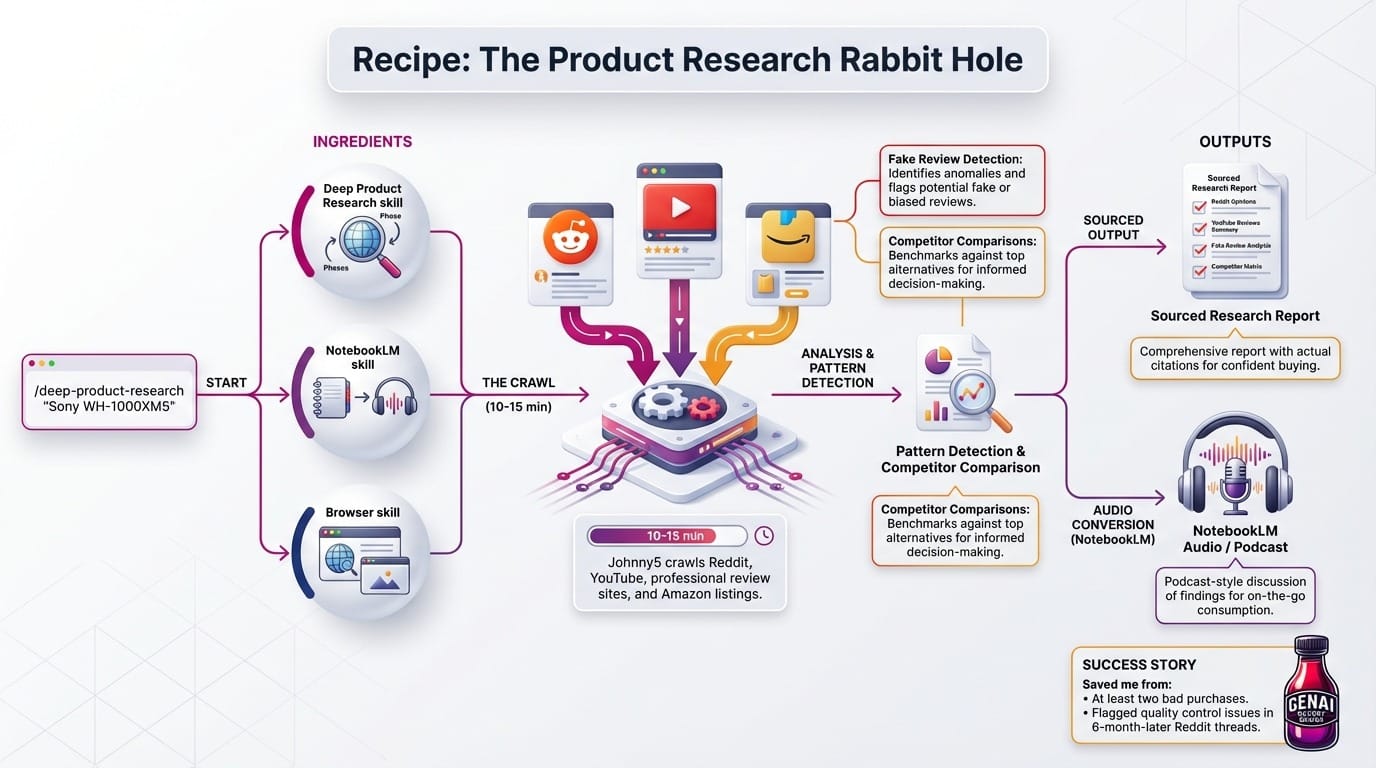
How it works:
/deep-product-research "Sony WH-1000XM5"
Johnny5 spends 10-15 minutes crawling Reddit threads, YouTube reviews, professional review sites, and Amazon listings. It detects patterns in fake reviews, compares against competitors, and produces a sourced report with actual citations.
Then the fun part: Feed that report into NotebookLM audio, and you get a podcast-style discussion of the findings. I listen to it while doing chores and come out the other side actually informed.
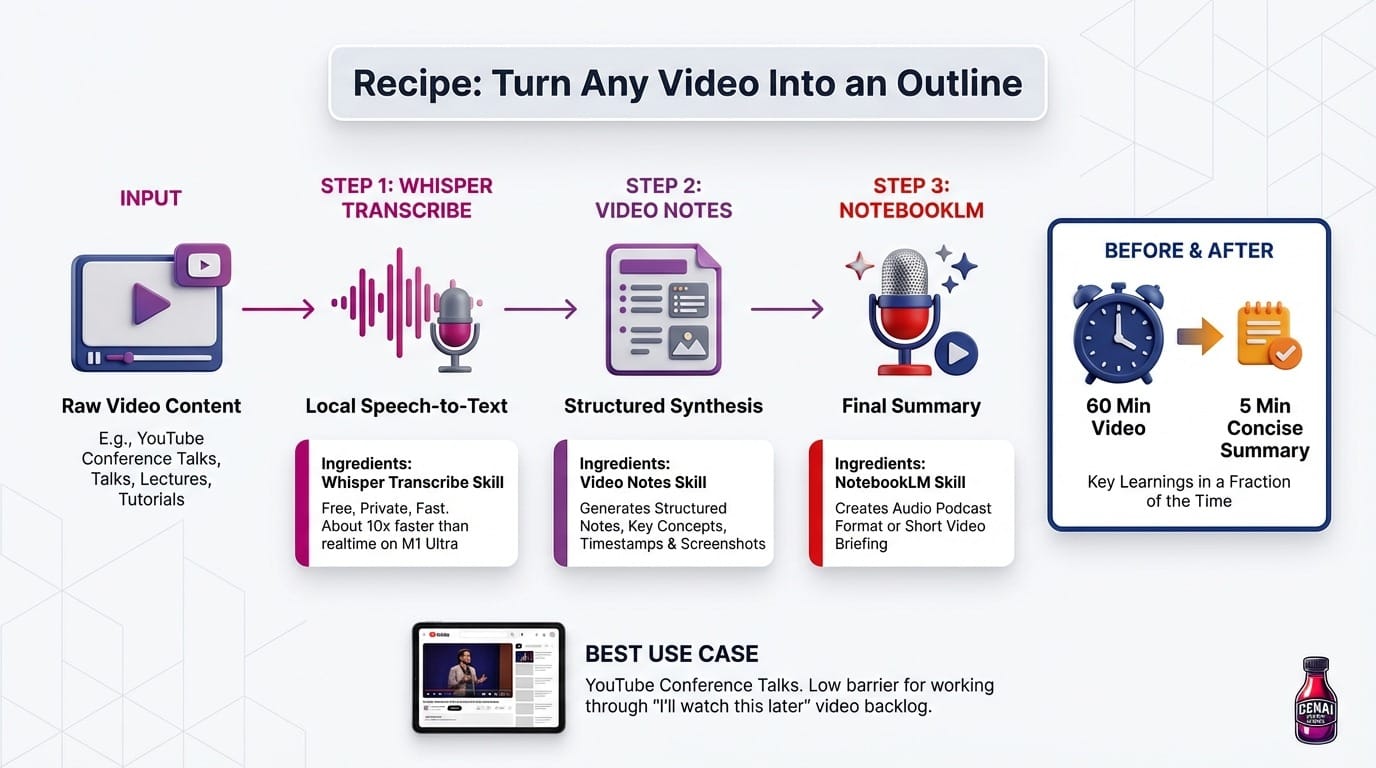
Recipe: Turn Any Video Into an Outline
What you get: Structured notes, timestamps, key concepts from any video content.
Ingredients:
- Whisper Transcribe skill - Local speech-to-text (free, private, fast)
- Video Notes skill - Generates structured notes with screenshots
- NotebookLM skill - Creates audio summary or short video.
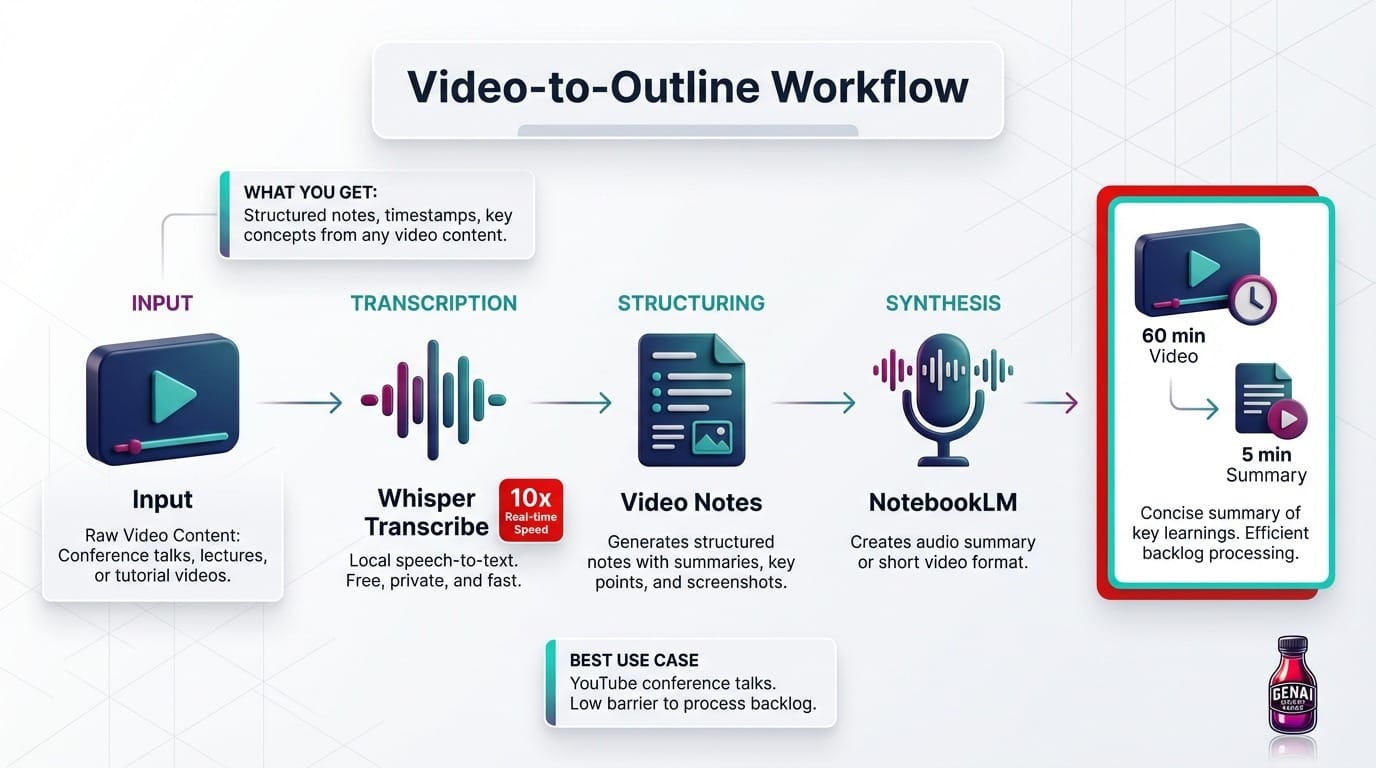
How it works: Point it at a conference talk, lecture, or tutorial video. Whisper transcribes it locally (about 10x faster than realtime on my M1 Ultra). Video Notes generates a structured document with summaries, key points, and timestamps. NotebookLM can then generate an audio podcast format or video summary. That 60 min conference talk becomes a 5 minute concise summary of key learnings..
Best use case: YouTube conference talks. I have a backlog of "I'll watch this later" videos that I'm actually working through now because the barrier is so much lower.
Recipe: AI Music On Demand
What you get: Original music from text descriptions.
Ingredients:
- ACE-Step skill - Text-to-music generation
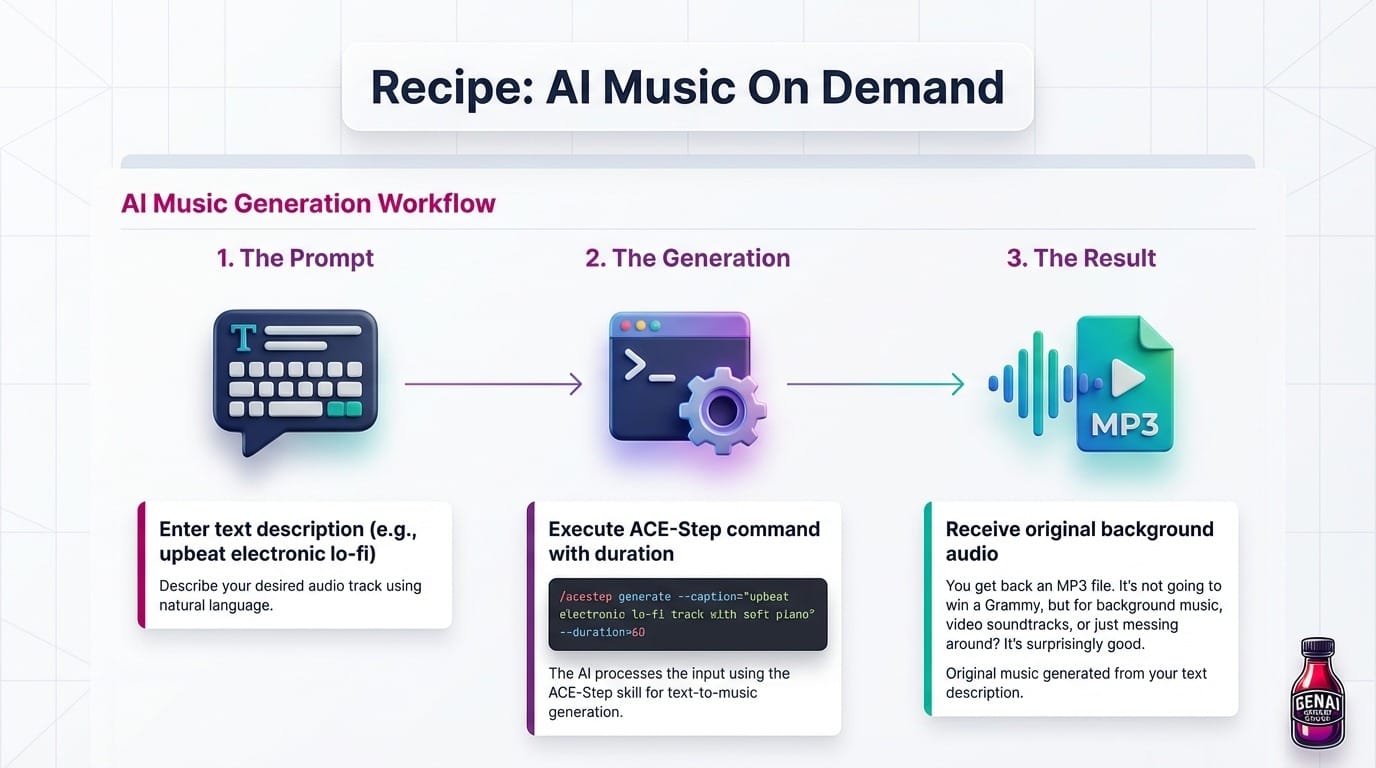
How it works:
/acestep generate --caption="upbeat electronic lo-fi track with soft piano" --duration=60
You get back an MP3. It's not going to win a Grammy, but for background music, video soundtracks, or just messing around? It's surprisingly good.
Recipe: The Content Transformer
What you get: One piece of content becomes five different formats.
Ingredients:
- Whisper Transcribe skill - Get the text
- NotebookLM skill - Generate any output format
- Google Workspace skill - Save and organize
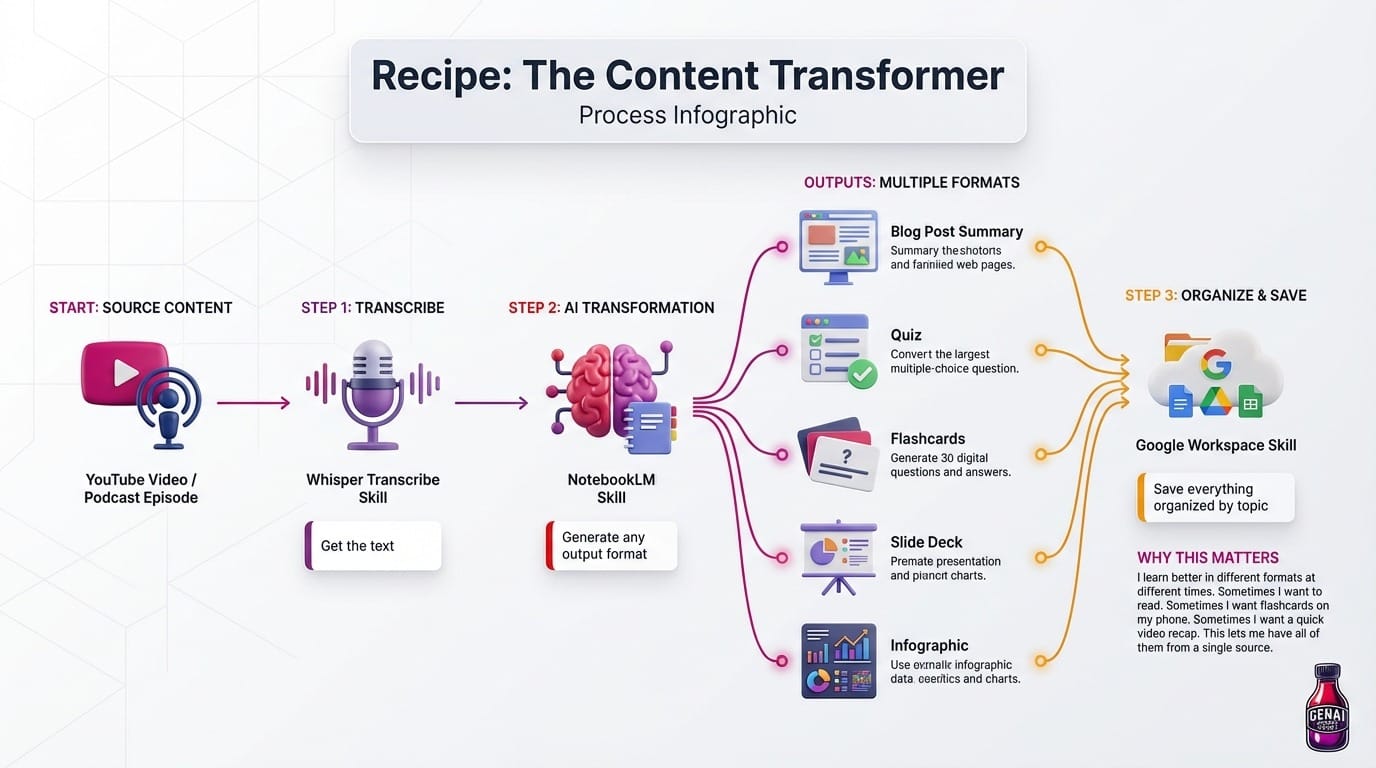
How it works: Start with a video or podcast episode. Transcribe it with Whisper. Feed the transcript to NotebookLM and ask for a blog post summary, a quiz, flashcards, a slide deck, or an infographic. Save everything to Google Drive organized by topic.
The LEGO Effect
Here's the thing: each skill I add makes every other skill more valuable. They're designed to chain together.
To connect those skills into an operating model, build a dedicated agent mission control.
NotebookLM can output to slides. Slides can be enhanced with Gemini-generated images. Those images can use voice-cloned narration. The whole thing can be scheduled to run automatically and deliver to Telegram.
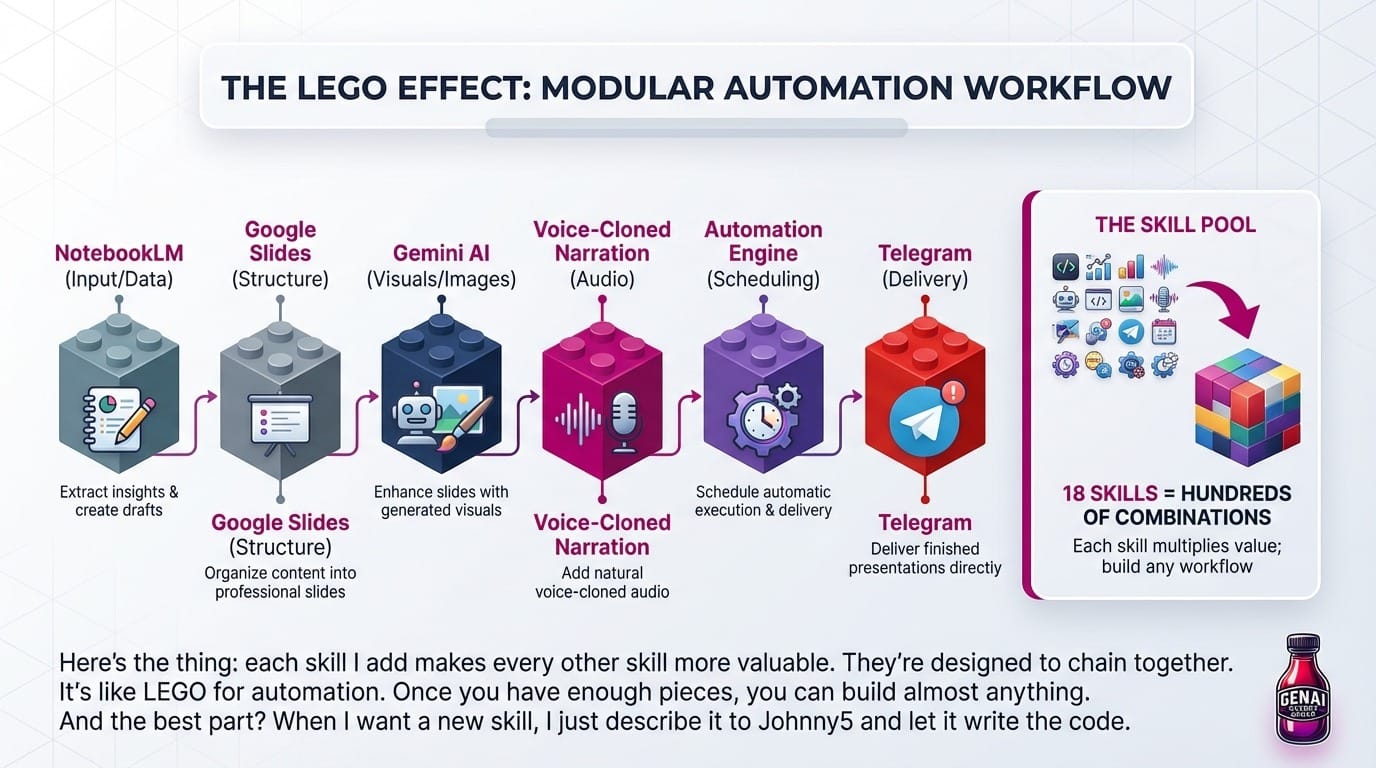
It's like LEGO for automation. Once you have enough pieces, you can build almost anything. The 18 skills I have now combined into hundreds of possible workflows.
And the best part? When I want a new skill, I just describe it to Johnny5 and let it write the code. Which brings us to the next lesson.
Lesson 6: Self-Healing AI
Anthropic reports that 70-90% of their own engineering code is now written by AI. Impressively, about 90% of their AI coding tool's codebase was written by the tool itself. We're officially in weird recursive territory.
But I've seen it firsthand. I've watched Johnny5:
- Identify that a dependency was missing
- Install it
- Realize the installation broke something else
- Debug that issue
- Refactor the original code to avoid the problem entirely
- Write tests to prevent regression
All from a single prompt. I asked for one thing and got a complete solution to problems I didn't even know I had.
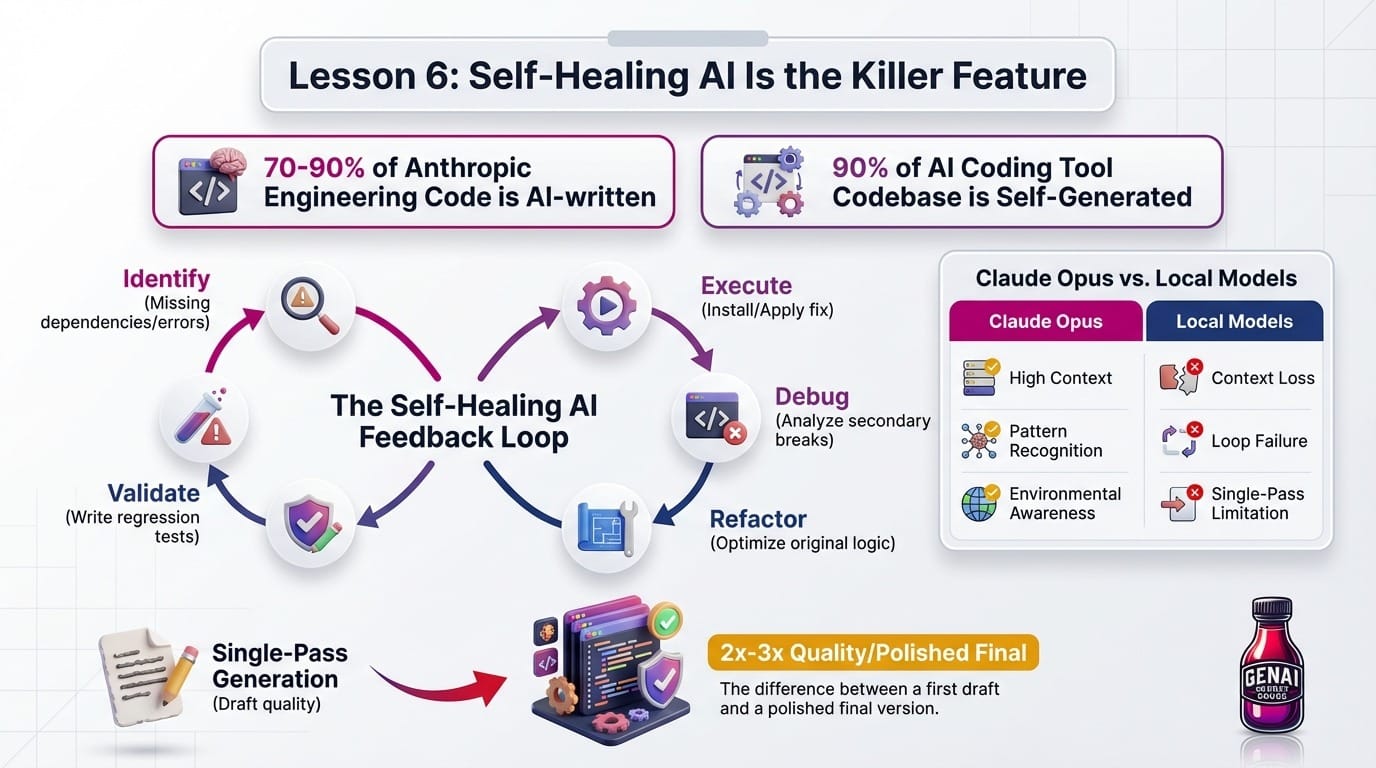
This is what you're paying for with Claude Opus. The ability to complete the loop without constant human intervention. You describe what you want, walk away, and come back to working code. Or at least code that tried very hard and can explain exactly why it failed.
Local models struggle here because they need to:
- Maintain long context across multiple tool calls
- Recognize patterns across failures
- Know when to try something different vs. iterate on the same approach
- Understand the difference between "this error is my fault" and "this error is environmental"
This is the superpower that justifies the cost. When the AI can verify its own work through feedback loops, it often doubles or triples output quality compared to single-pass generation. It's the difference between a first draft and a polished final version.
Lesson 7: Most Skills Are Malware
This one caught me off guard. When I first started exploring Johnny5, the obvious approach was to install existing MCP servers and skills from npm. Why reinvent the wheel?
(Quick explainer: MCP stands for Model Context Protocol, a standard for connecting AI assistants to external tools. npm is the main package registry for JavaScript, where developers share code. MCP servers are essentially plugins that give OpenClaw new abilities: send emails, access calendars, control browsers, etc.)
Turns out, many of those plugins are trojans.
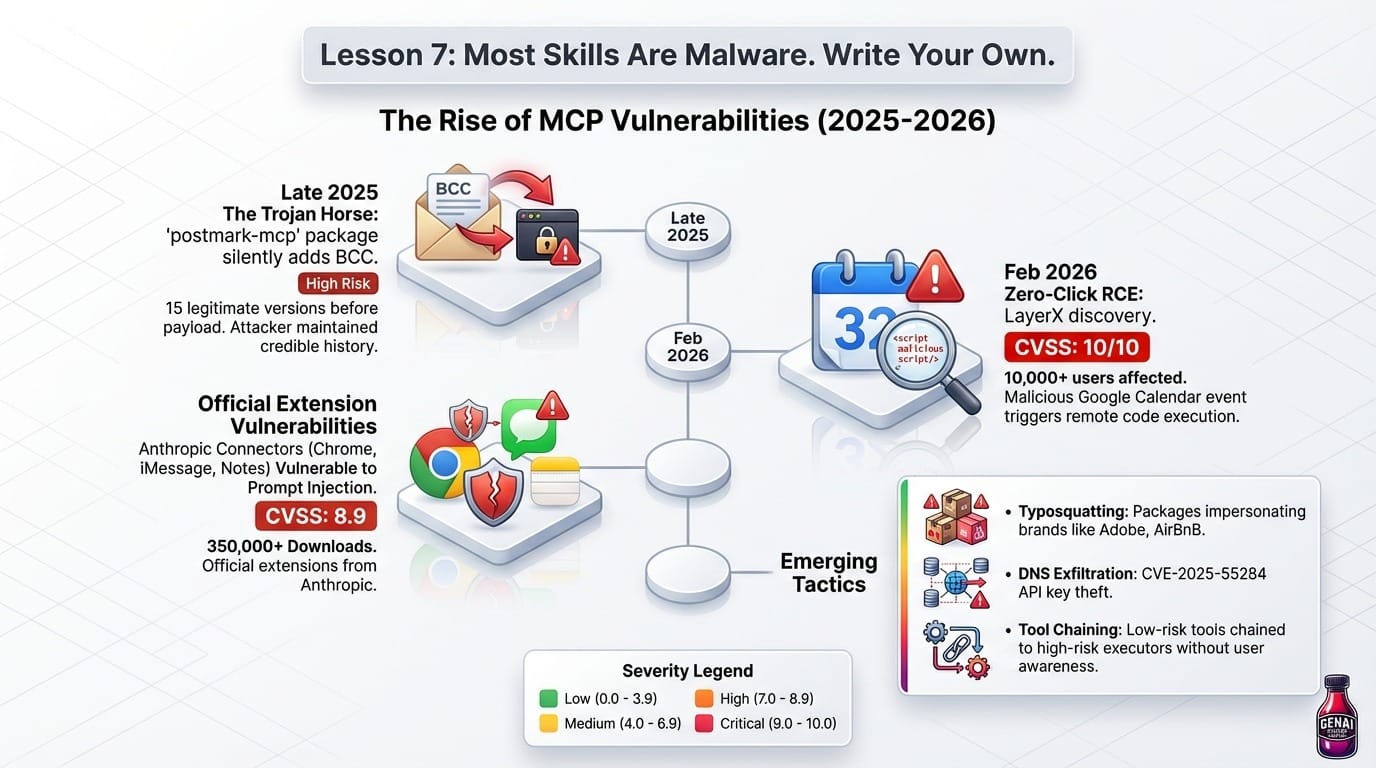
The MCP ecosystem has a serious security problem. In late 2025, the first confirmed malicious MCP server was discovered on npm. A package called postmark-mcp silently added a BCC to every email sent through it, exfiltrating contents to an attacker-controlled domain. The scary part? The attacker maintained 15 legitimate versions before adding the malware. The account looked real. An active developer based in Paris with a credible history.
It gets worse. In February 2026, LayerX discovered a zero-click RCE vulnerability affecting over 10,000 users. The attack? A malicious Google Calendar event could trigger remote code execution. CVSS score: 10 out of 10. That's the security equivalent of "literally the worst possible score."
Koi Security found that three official Anthropic extensions were vulnerable to prompt injection attacks (CVSS 8.9). The Chrome, iMessage, and Apple Notes connectors. These extensions had 350,000+ downloads. The official ones. From Anthropic.
Other documented issues include:
- CVE-2025-55284: API key theft via DNS exfiltration
- Typosquatting attacks with packages impersonating Adobe, AirBnB, and other brands
- Extensions that chain low-risk tools to high-risk executors without user awareness
Remember when I said justified paranoia? This is why I kept everything sandboxed.
My Solution: Have the AI Rewrite Everything
Instead of installing third-party skills, I had Johnny5 write safe versions from scratch. Here's the workflow:
- Find a skill that does what I need (for reference, not installation)
- Describe the functionality to the AI without sharing the original code
- Have it write a clean implementation that I can audit
- Review the code myself before running it
This approach has several advantages:
- No hidden dependencies: I know exactly what's in each skill
- No supply chain attacks: Nothing gets pulled from npm at runtime
- Tailored to my needs: The AI writes exactly what Johnny5 needs, nothing more
- Auditable: Every line of code is visible and understandable
Yes, it takes longer. But given that simple fake websites can trick AI assistants into downloading and running malware, the extra effort is worth it.
What's Being Done About It
To their credit, the security community has responded:
- Automated security review capabilities that scan code for vulnerabilities
- Sandboxed environments with filesystem and network isolation
- Detection systems using "probes" to flag potential misuse in real-time
But the fundamental architecture remains risky. Many extensions still run with broad privileges, and the MCP ecosystem is still largely unvetted. Until that changes, I'm writing my own skills. I know exactly what my kitten has been exposed to, because I control what it touches.
My Recommendations
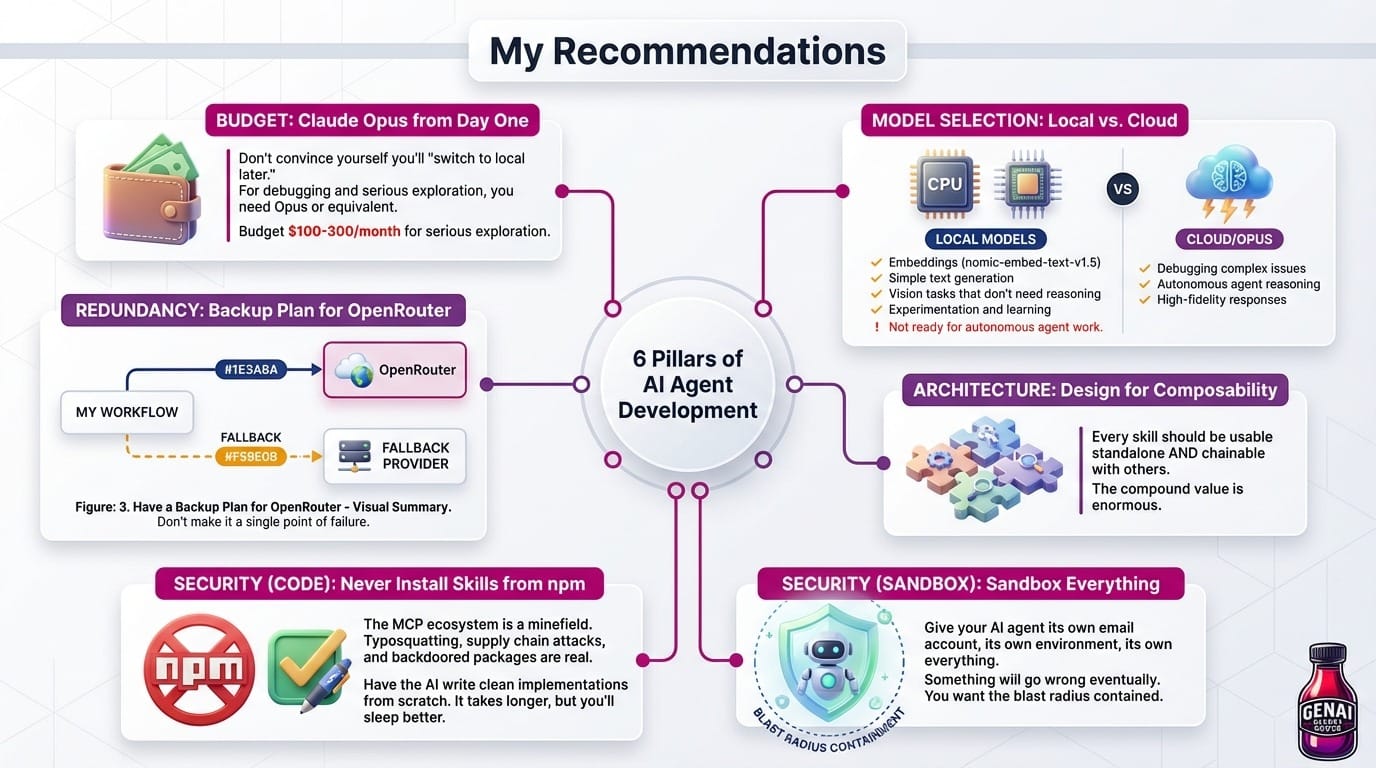
After two weeks of intense exploration, here's what I'd tell past-me:
1. Budget for Claude Opus from Day One
Don't convince yourself you'll "switch to local later." If you're building anything that needs to debug itself, you need Opus 4.5 or equivalent. Budget $100-300/month for serious exploration.
WARNING: DO NOT USE OPUS 4.6 FAST MODE. You'll burn $50 a hour. Don't ask me how I know 🤦♂️
2. Reserve Local Models for Simple Tasks
Local models are great for:
- Embeddings (nomic-embed-text-v1.5)
- Simple text generation
- Vision tasks that don't need reasoning
- Experimentation and learning
They're not ready for autonomous agent work.
3. Have a Backup Plan for OpenRouter
If you use OpenRouter, build in fallbacks. Don't make it a single point of failure for your workflow.
4. Design for Composability
Every skill should be usable standalone AND chainable with others. The compound value is enormous.
5. Never Install Skills from npm. Write Your Own.
The MCP ecosystem is a minefield. Typosquatting, supply chain attacks, and backdoored packages are real and documented. Have the AI write clean implementations from scratch. It takes longer, but you'll sleep better.
6. Sandbox Everything
Give your AI agent its own email account, its own environment, its own everything. Something will go wrong eventually. You want the blast radius contained.




Member discussion