The first truly scary moment in agent development is not when the model says something weird in a chat window.
It is when the agent graduates from answering to acting.
The moment your AI can send a Slack message, create a Jira ticket, update a database row, or fire off an email, you have crossed an important line. The problem is no longer just prompt quality. The problem is now operational safety.
That is why one of the most important features in a Mission Control system is Human-in-the-Loop (HITL) approvals.
In the main Mission Control article, the Inbox is one of the core features because it is the place where AI autonomy becomes operationally safe. If you are building your own mission control, this is one of the earliest patterns worth getting right. It is not just a UX detail. It is part of the trust architecture for the whole system.
The Simple Rule
Here is the rule I design around:
For the broader organizational framework behind these controls, see Safe Engineering AI Adoption.
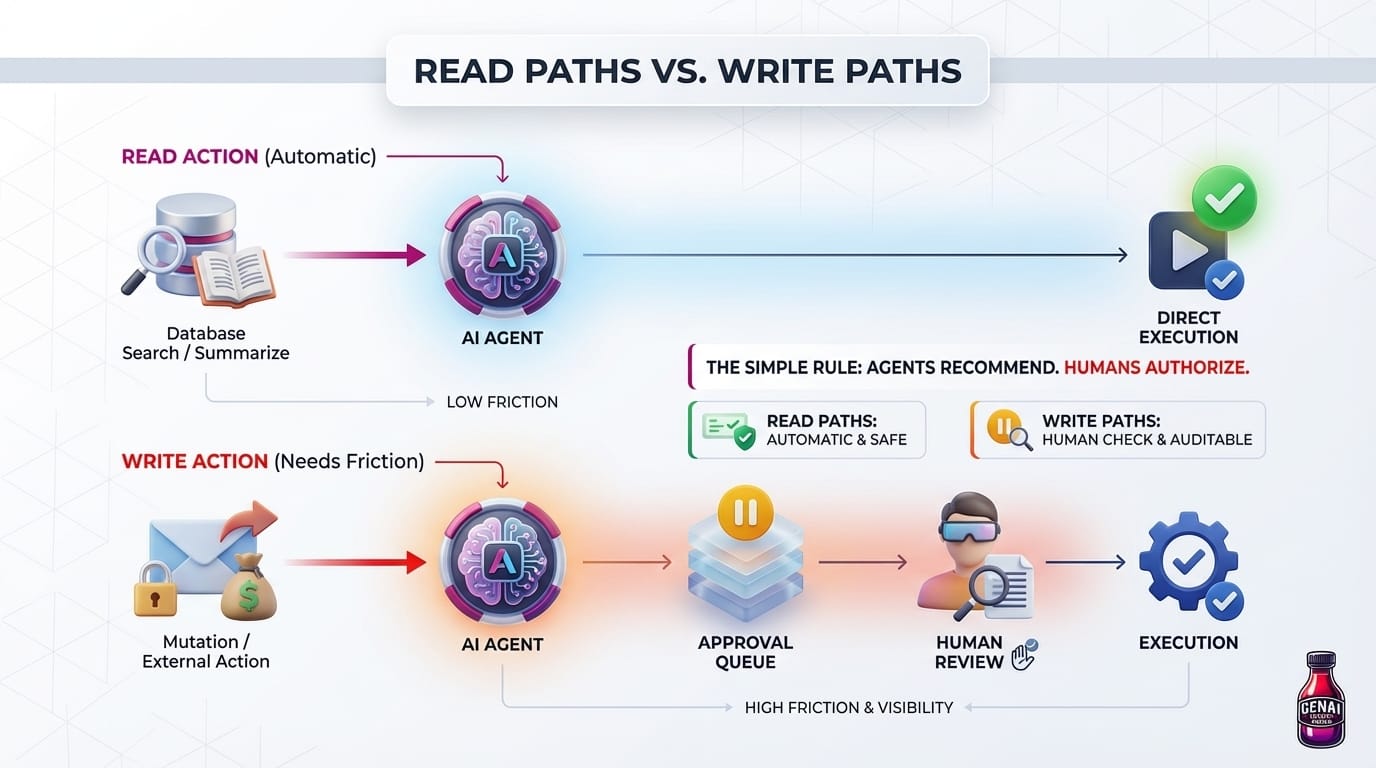
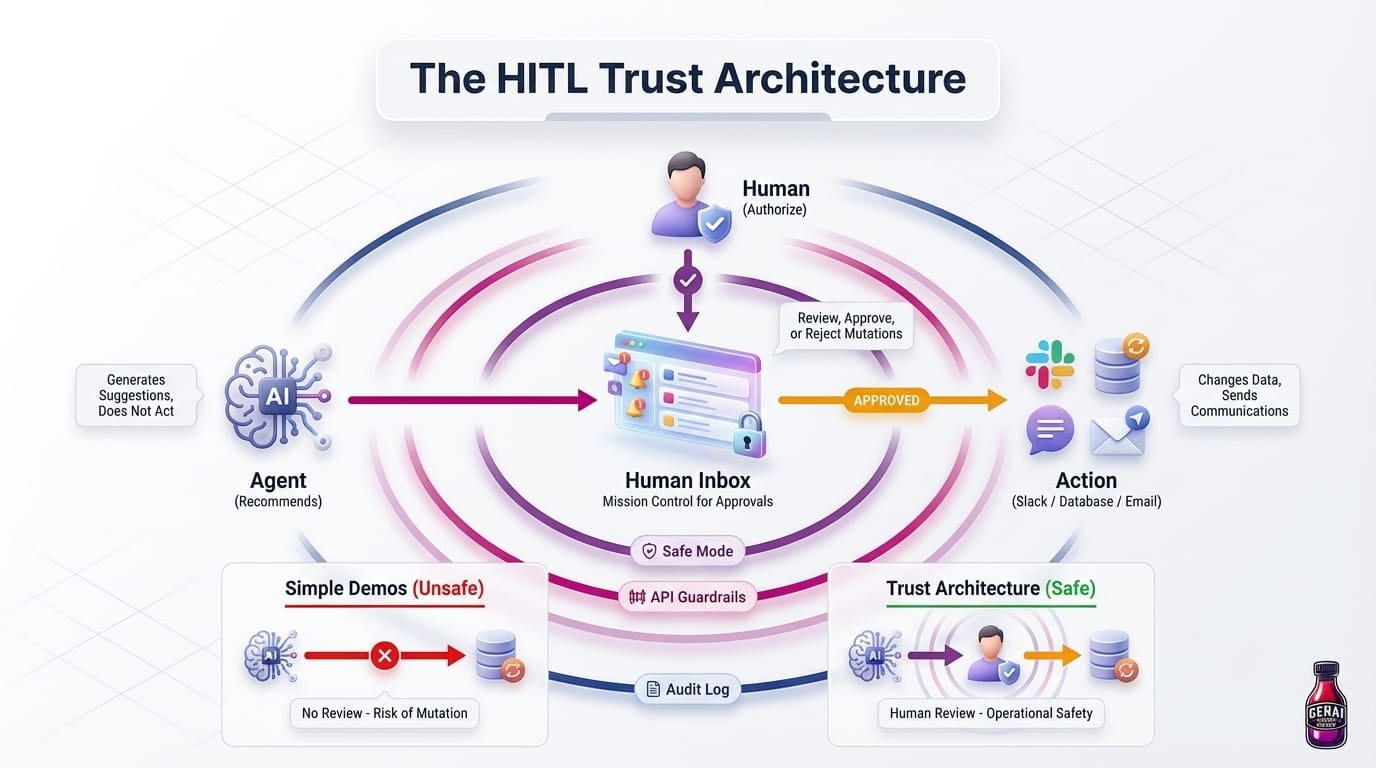
Agents can recommend. Humans authorize.
That one rule immediately makes your system more trustworthy.
Most agent demos show a flow like this:
Prompt -> LLM -> Tool Call -> Execute -> Done
That flow is fine for read-only actions such as searching notes, summarizing a transcript, or gathering project context.
It is not fine for mutations.
As soon as an action can change data, contact another person, spend money, or expose information outside your app, your system should switch to this pattern instead:
Prompt -> LLM -> Tool Call -> Approval Queue -> Human Review -> Execute -> Done
That approval queue is not a nice-to-have. It is the control surface that makes autonomy usable in the real world.
Why This Matters So Much
People usually imagine the catastrophic failure case: the rogue agent that deletes data or sends something embarrassing to the wrong channel.
But the more common failure mode is smaller and more dangerous because it looks harmless at first:
- An agent drafts a reply with the wrong tone and damages stakeholder trust
- An automation creates duplicate tasks that slowly pollute your system
- A summarizer misreads a meeting and turns a suggestion into a committed action item
- A browser agent follows prompt-injected instructions on a page and takes the wrong action
None of those require a sci-fi disaster to be expensive. They just need to happen repeatedly. Human review turns these from silent failures into visible decisions.
Treat the Inbox as a Product Feature, Not a Safety Patch
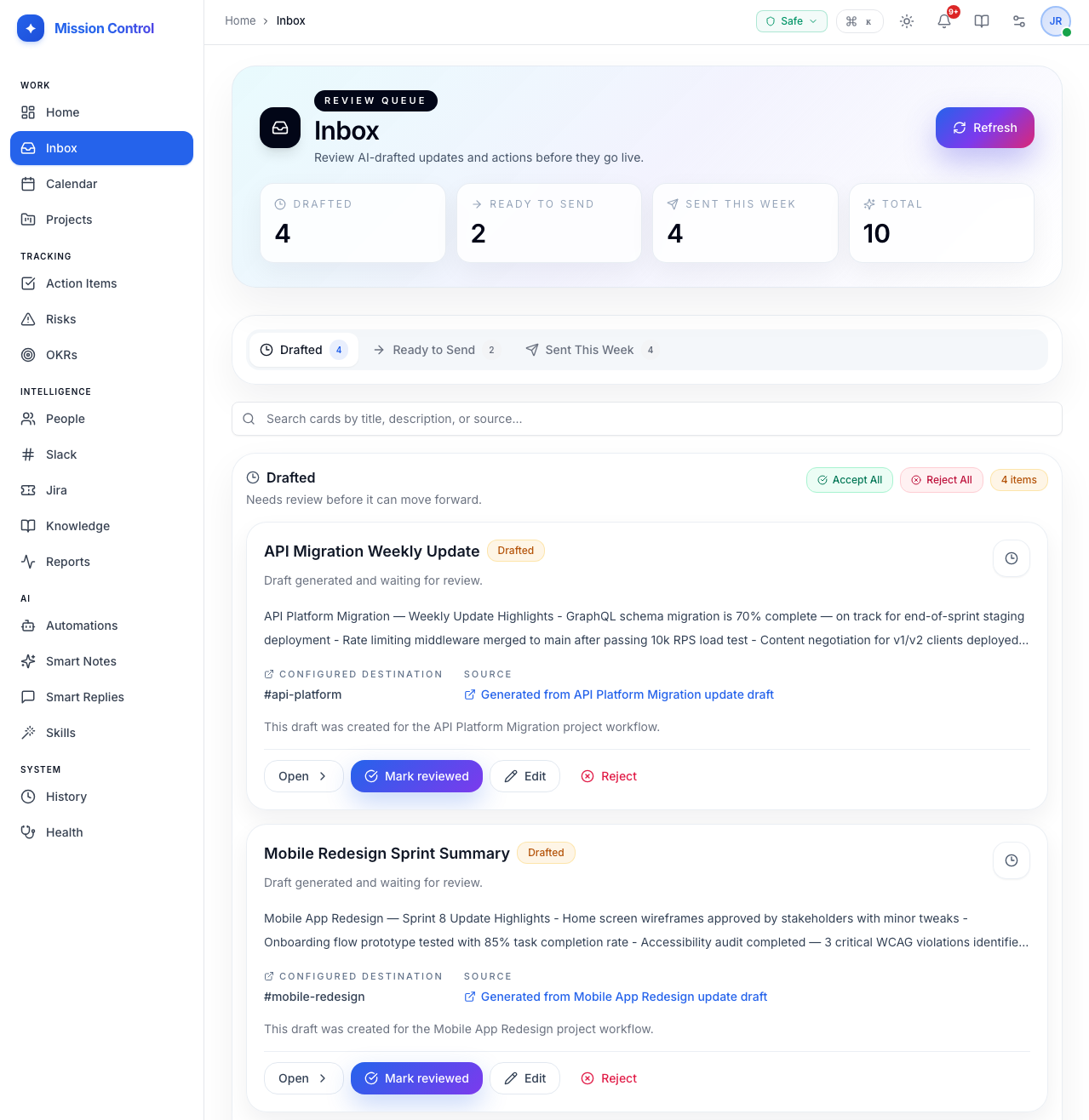
If you are building your own mission control, the approval queue should be a first-class feature in the UI, not a hidden backend mechanism.
Your Inbox should show:
- What the agent wants to do
- Why it wants to do it
- Which source data it used
- What system or person will be affected
- The exact payload that will be sent or written
- Clear approve and reject actions
In other words: do not just show “Send message?” Show the draft, the destination, the triggering workflow, and the context behind it.
The goal is not merely to stop bad actions. The goal is to make it easy for you to review good ones quickly.
What Should Always Require Approval?
As a general rule, I would route these categories through HITL by default:
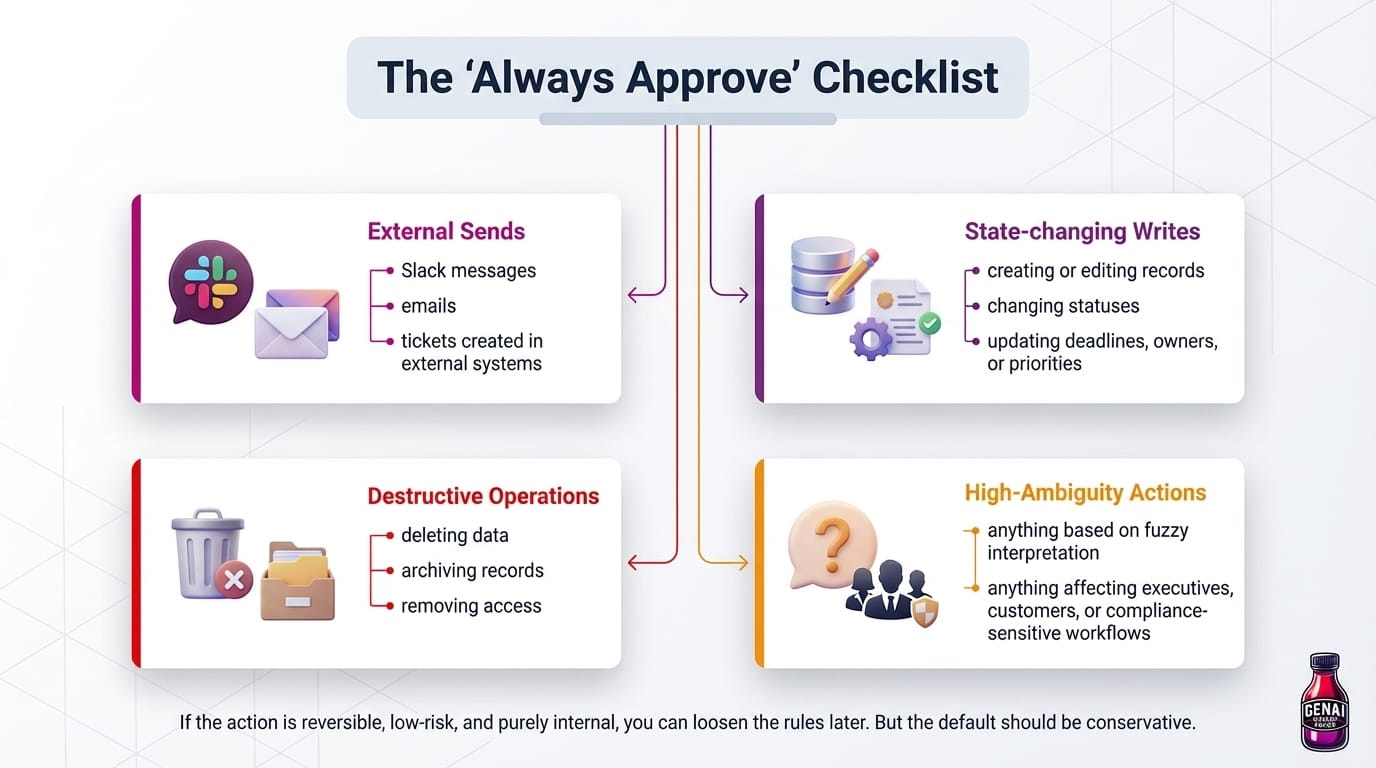
- External sends
- Slack messages
- emails
- tickets created in external systems
- State-changing writes
- creating or editing records
- changing statuses
- updating deadlines, owners, or priorities
- Destructive operations
- deleting data
- archiving records
- removing access
- High-ambiguity actions
- anything based on fuzzy interpretation
- anything affecting executives, customers, or compliance-sensitive workflows
If the action is reversible, low-risk, and purely internal, you can loosen the rules later. But the default should be conservative.
The Right Mental Model: Reads Can Be Automatic, Writes Need Friction
This is the design distinction that matters most:
- Read paths can often be fully autonomous
- Write paths need friction, visibility, and auditability
That friction is not bad UX. It is what keeps your automation from becoming a liability.
In fact, the best approval systems often increase adoption because people feel comfortable using the AI for higher-value tasks once they know there is a checkpoint before anything leaves the system.
Trust Levels Let You Scale Autonomy Safely
Not every workflow deserves the same amount of freedom. A good Mission Control should support explicit trust levels so autonomy can expand gradually instead of all at once.
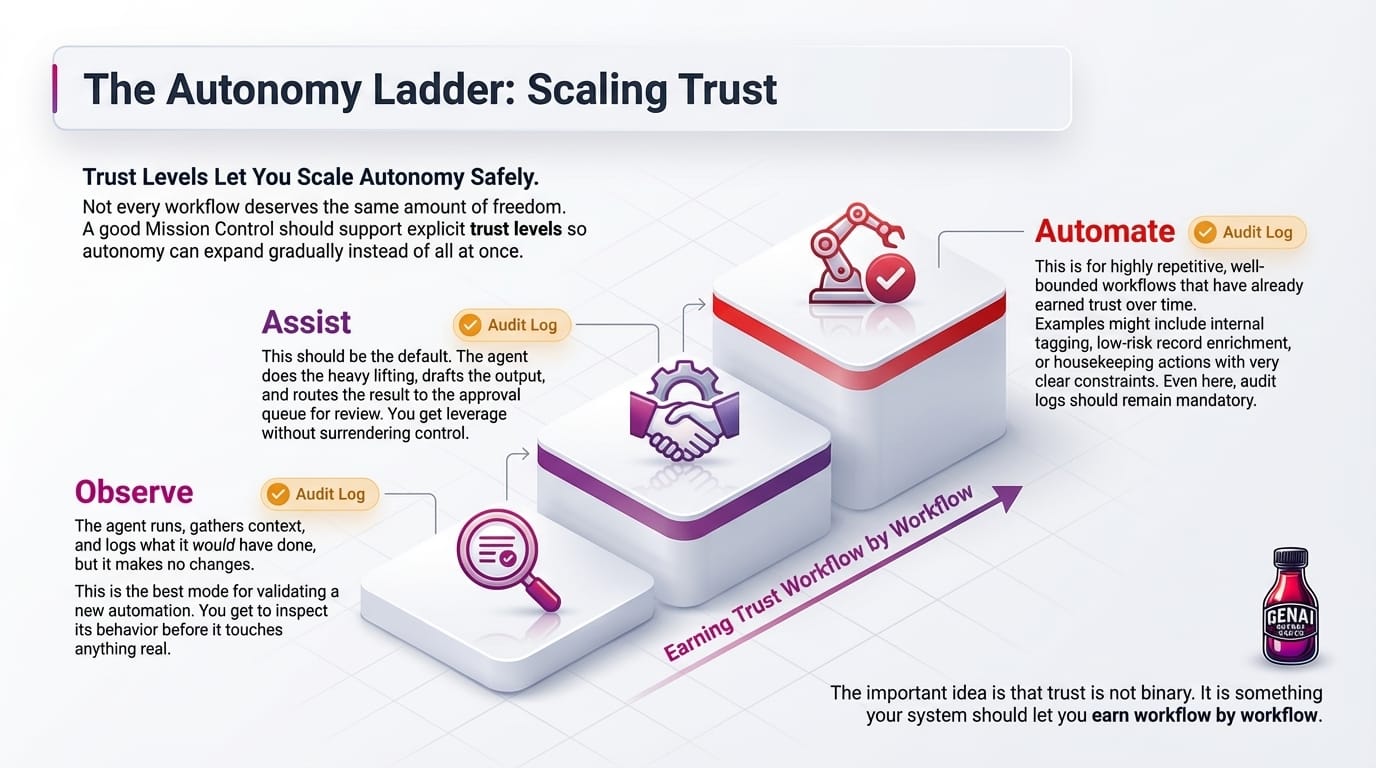
Observe: The agent runs, gathers context, and logs what it would have done, but it makes no changes.
This is the best mode for validating a new automation. You get to inspect its behavior before it touches anything real.
Assist: This should be the default.
The agent does the heavy lifting, drafts the output, and routes the result to the approval queue for review. You get leverage without surrendering control.
Automate: This is for highly repetitive, well-bounded workflows that have already earned trust over time.
Examples might include internal tagging, low-risk record enrichment, or housekeeping actions with very clear constraints. Even here, audit logs should remain mandatory.
The important idea is that trust is not binary. It is something your system should let you earn workflow by workflow.
Safe Mode: The System-Wide Override
Trust levels are per-workflow guardrails. But sometimes you want a higher-level switch that overrides everything.
That is where Safe Mode comes in.
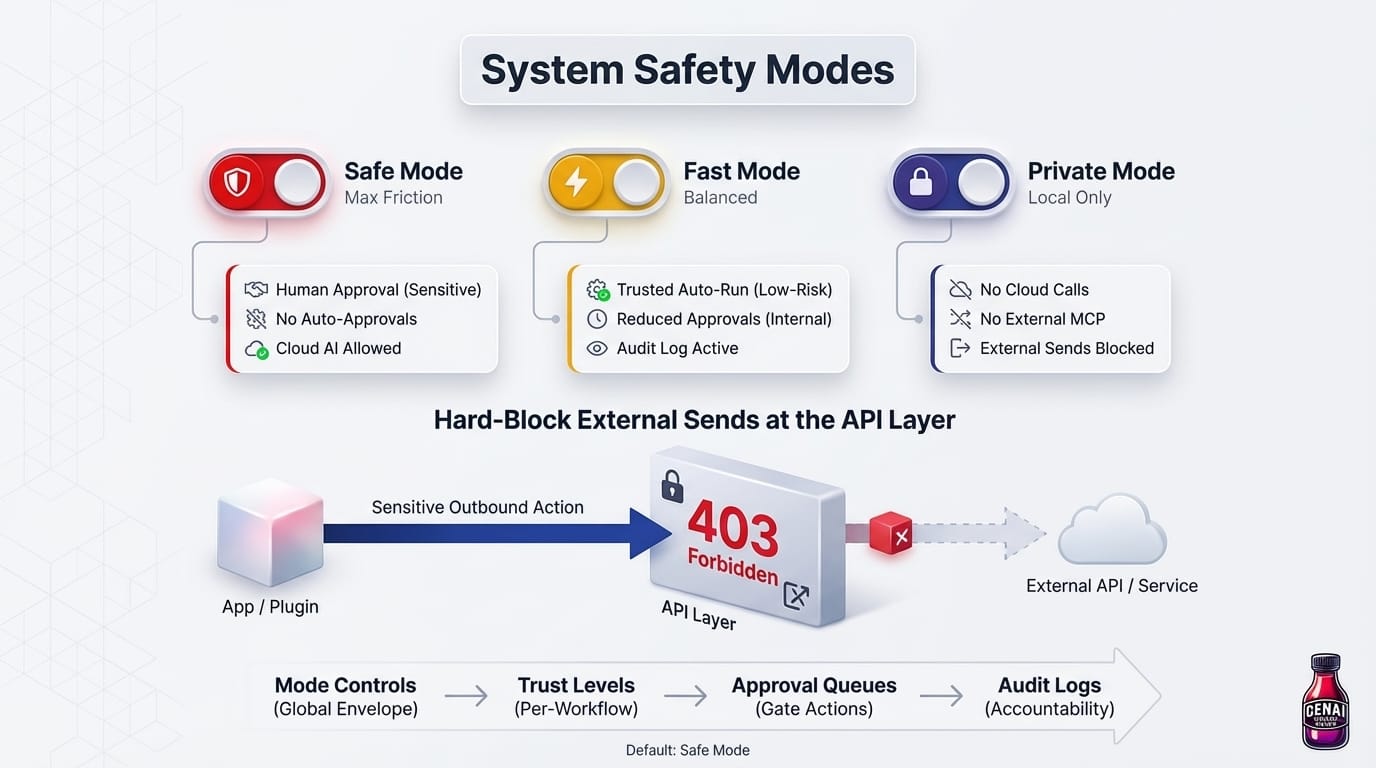
My preferred model is three operating modes:
- Safe
- everything sensitive requires human approval
- no auto-approvals
- cloud AI calls are allowed
- Fast
- trusted low-risk actions can run automatically
- approvals are reduced for bounded internal workflows
- audit logging still remains on
- Private
- no cloud model calls
- no external MCP services
- external sends blocked
- designed for local-only setups
If no mode has been chosen, the system should fall back to safe by default.
Hard-Block External Sends at the API Layer
One of the most important lessons here is that safety should not depend entirely on polite UI behavior. If your app is in safe mode, sensitive outbound actions should be blocked at the API layer itself. For example, if an automation or plugin tries to send a Slack message while external sends are disallowed, the backend should reject it with a hard 403 before anything is transmitted. That matters because it protects you even if the action is triggered from the wrong part of the app, from an unexpected plugin path, or from a bug in the front end.
This is the layered model:
- Mode controls define the global safety envelope
- Trust levels define per-workflow autonomy
- Approval queues gate sensitive actions
- Audit logs preserve accountability after execution
Each layer catches a different class of mistake.
Approvals Need a Matching Audit Trail
Approvals are only half of the trust story.
Reviewing an action before it happens is critical, but you also need a way to inspect what your agents have already done. That is where a full Agent History becomes part of the same trust-and-safety layer.
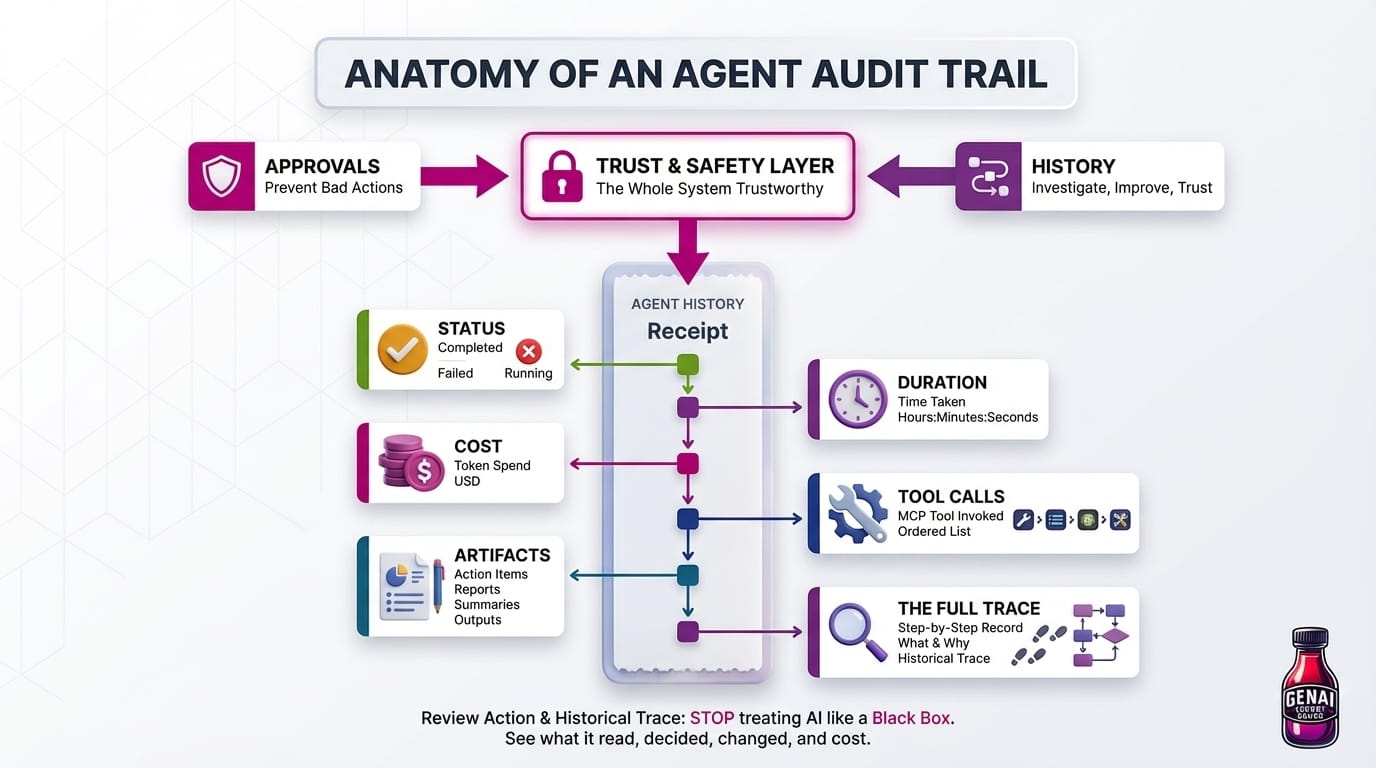
Your mission control should keep a searchable audit trail of every agent run, including:
- Status: completed, failed, or still running
- Duration: how long the run took
- Cost: exact token spend in USD
- Tool calls: every MCP tool the agent invoked, in order
- Artifacts: action items, reports, summaries, or other outputs it produced
- The full trace: a step-by-step record of what the agent did and why
This is not just a debugging feature. It is what makes the whole system trustworthy. When you can review both the proposed action in the Inbox and the historical trace after execution, you stop treating the AI like a black box. You can see what it read, what it decided, what it changed, and what it cost.
That combination is powerful:
- Approvals help prevent bad actions before they happen
- History helps you investigate, improve, and trust the system over time
Builder Checklist
If you are implementing HITL in your own app, here is the version I would start with:
- Route all external sends and mutating actions into one shared Inbox
- Store enough context with each approval request to make fast human review possible
- Make assist the default trust level for new automations
- Add an observe mode so you can test workflows without side effects
- Require audit logs even for trusted automations
- Store a full run history with status, duration, cost, tool calls, artifacts, and trace data
- Add a system-wide safe mode that overrides workflow-level settings
- Enforce the highest-risk blocks in backend code, not just in the UI
This gives you a system that is still useful on day one, but does not assume trust it has not earned yet.
The Real Secret Sauce
The best AI systems do not feel magical because they are uncontrolled. They feel powerful because they are well-governed.
If you want agents that people will actually trust in real workflows, do not start by asking, “How do I make this fully autonomous?”
Start by asking, “Where does this system need a checkpoint?”
If you are building your own mission control, start here: one shared Inbox, explicit trust levels, a safe default mode, and a full audit trail. Once those foundations are in place, the rest of your automations become much easier to trust.


Member discussion