
On this page
I Tried to Build a Fully-Autonomous AI Teaching Agent. Here’s Why I’m Pausing for 3 Months.
A few weeks ago, I was tasked with training 100% of our employees on a new technology by the end of the year. The standard playbook would be a whirlwind of slide decks, recorded webinars, and endless roadshows. It would be a one-to-many broadcast designed for efficiency, not effectiveness.
This is the central challenge of corporate learning. Unlike academia, where courses are perfected over a semester, our content has a shelf life of months. We don’t have the luxury of time, we have the pressure of immediate business needs. Our process is to launch fast, gather feedback, and iterate constantly. We’re always building the bike while we ride it.
Our focus is on the "minimum viable learning unit," the essential knowledge needed to get the job done. But how do you deliver that at scale without resorting to impersonal, one-size-fits-all content?
I realized I had to find a way to break the model. I needed to transform myself from a single trainer into an entire army of personal tutors, each one capable of giving every employee a dedicated, one-on-one session.
How could GenAI be a personalized mentor, available 24/7, that could:
- Assess each employee's existing knowledge.
- Adapt the training content and pace to them in real time.
- Answer their specific questions with context from our own documentation.
- Role-play scenarios to test their practical skills.
- Track their mastery of specific skills, not just a "completion" checkmark.
The vision was clear: a scalable, truly personalized learning experience that would crush the year-end goal.
I was convinced this was the killer app for GenAI in corporate learning.
And I still am. But after building the initial prototype on my own time, I’ve learned a hard lesson: my vision is writing checks that today's technology can't quite cash yet. Let me take you on my journey.
The Glimmer of Magic: Building the Prototype
Using a stack of cutting-edge tools on a Saturday afternoon, I spun up a proof-of-concept. The tech stack was straightforward but powerful:
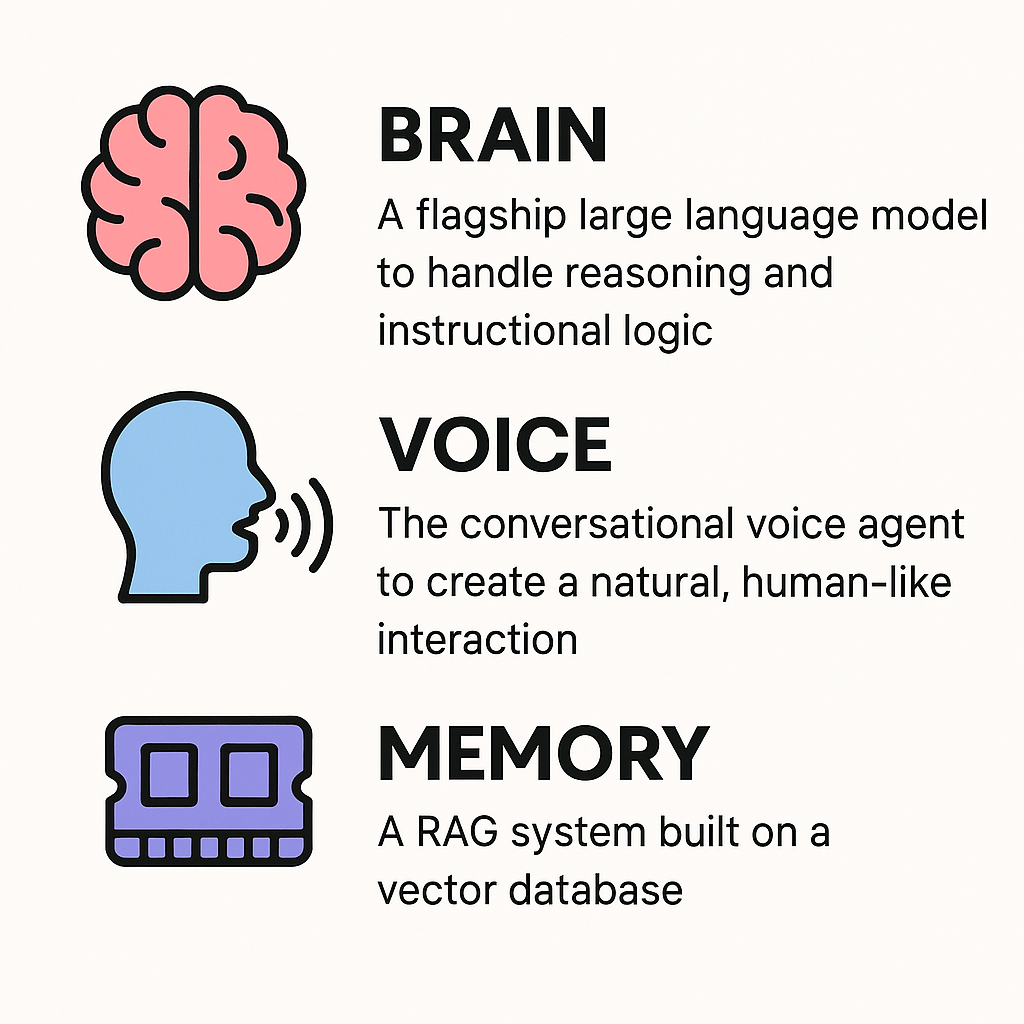
- The "Brain": A flagship large language model (like GPT-4o or Claude 3 Opus) to handle the reasoning and instructional logic.
- The "Voice": The conversational voice agent from ElevenLabs to create a natural, human-like interaction that avoids sterile, robotic text-to-speech.
- The "Memory": A RAG (Retrieval-Augmented Generation) system built on a vector database, which I fed the company's slide decks and internal wikis. This gave the AI long-term knowledge of our specific content.
The first time it worked, it was pure magic. The conversation flowed, it referenced our documents, and it felt like the future. But the real genius of the idea wasn't just in the live conversation, it was in the automated setup I designed.
Behind the Curtain: Turning Slides into Skills
I built a simple admin interface where I could upload any standard slide presentation. From there, GenAI took over, acting as an expert Instructional Designer. Here’s how it works, using the simple example of training someone to make a peanut butter and jelly sandwich.
Before loading the material, build or improve the source presentation first.
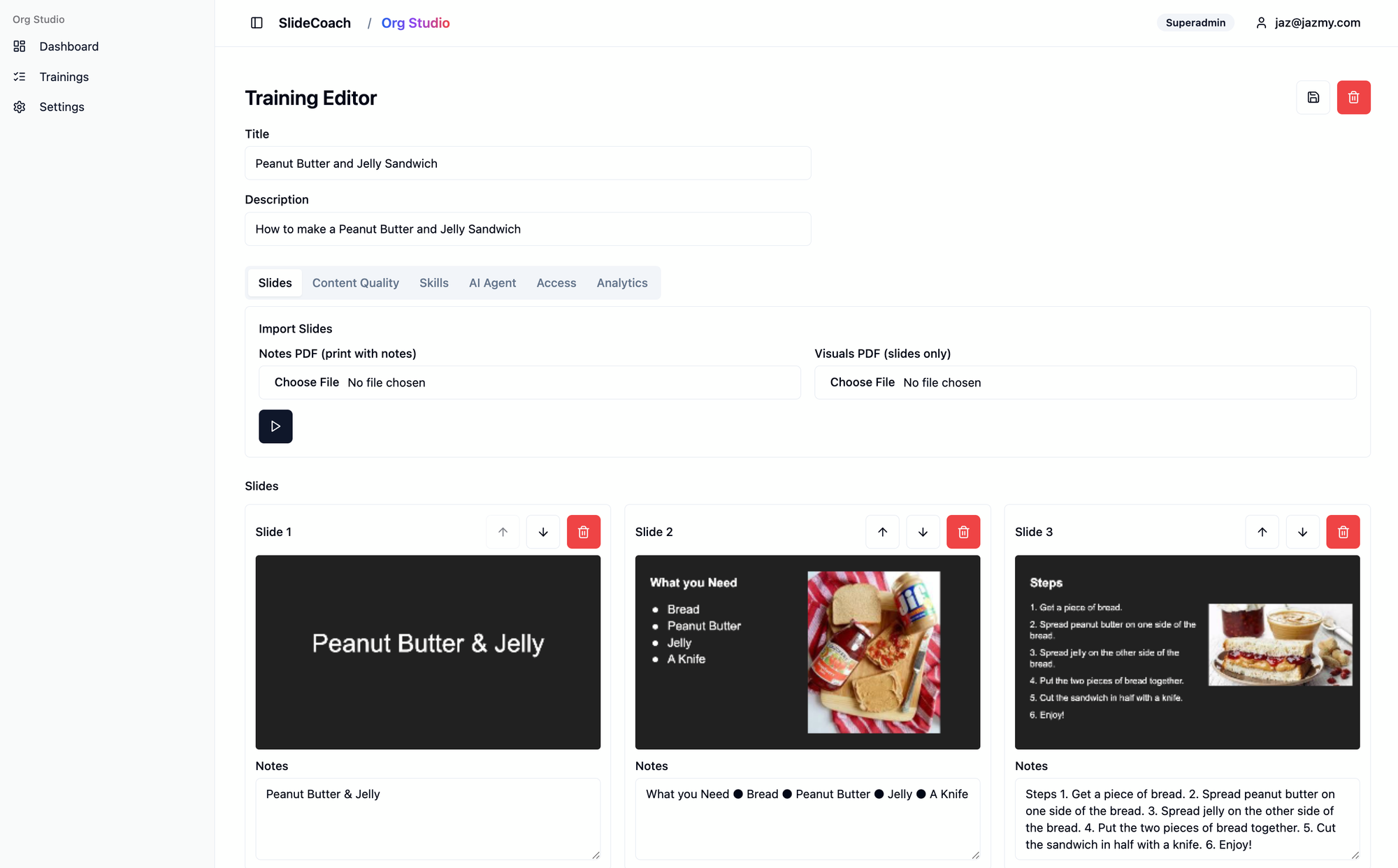
Step 1: Content Ingestion and Skill Identification I upload the "How to Make a Peanut Butter and Jelly Sandwich" slide deck. The AI reads the slides and speaker notes, but it doesn't just see words. It analyzes the content to identify the core, demonstrable skills a learner should acquire. For this presentation, it might identify two key skills:
- Skill: Following Recipe Steps - The learner must be able to recall and perform the steps in the correct sequence.
- Skill: Understanding Ingredients - The learner must be able to identify the necessary ingredients and their purpose.
Step 2: Automated Assessment Design Next, the AI automatically generates a rubric and a set of "Essential Questions" designed to test for genuine understanding of these skills. For our PB&J example, it would create:
- For the skill Following Recipe Steps:
- Essential Question: "What might happen if you skip or change the order of some steps?"
- For the skill Understanding Ingredients:
- Essential Question: "Can you list all the ingredients needed to make a peanut butter and jelly sandwich?"
Step 3: AI-Powered Instructional Design Review
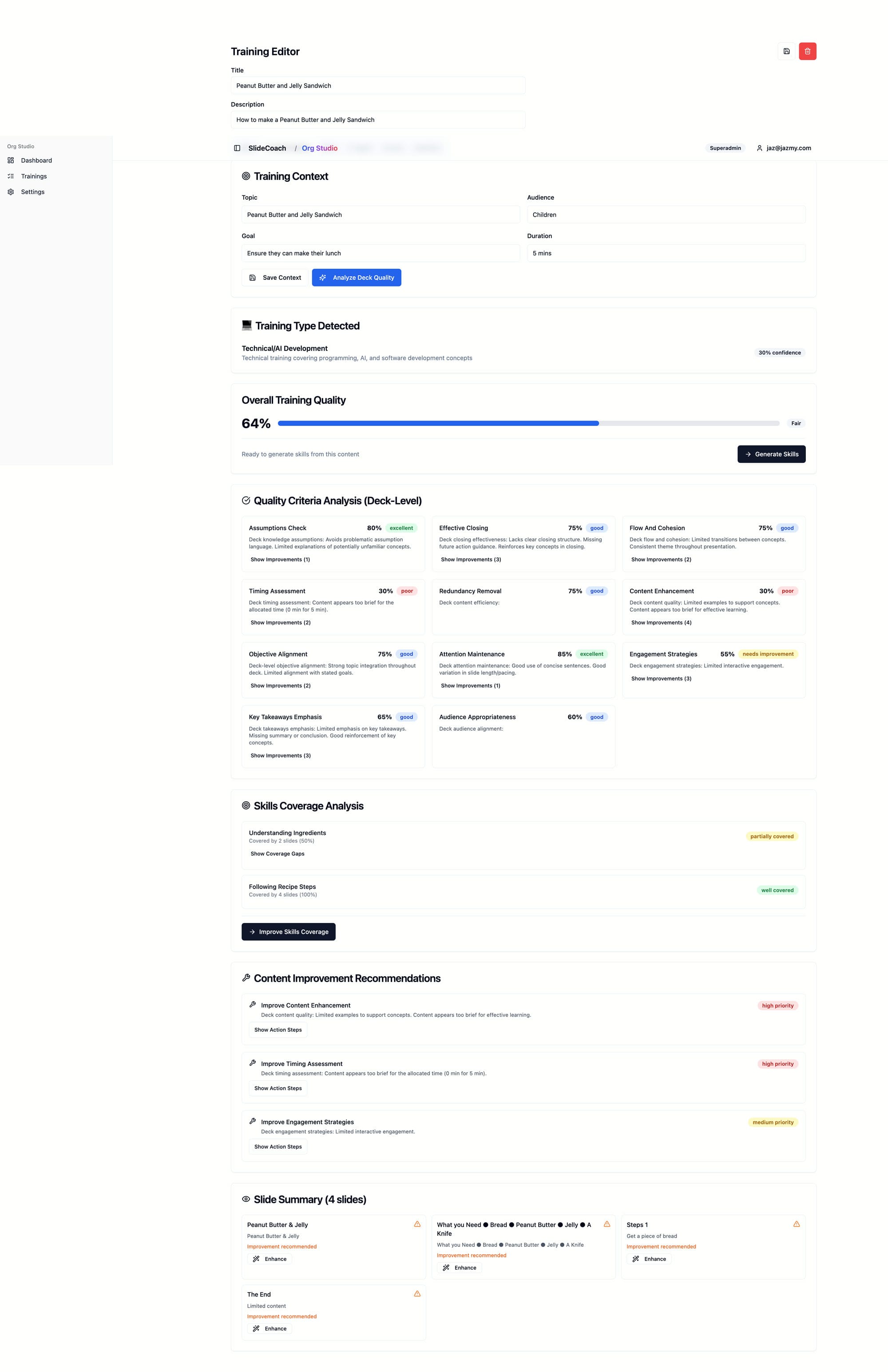
After identifying the core skills and designing assessments, the AI puts on a different hat: that of an expert instructional designer. It doesn't just blindly accept the uploaded content. Instead, it performs a comprehensive quality analysis, evaluating the slide deck against proven pedagogical principles to help me improve the source material before any employee ever sees it.
The system generates an "Overall Training Quality" score, but the real value is in the detailed breakdown. As you can see in the screenshot from my admin editor, it analyzes the entire deck across several key criteria:
- Actionable Outcomes: Does the training focus on what the learner will be able to do?
- Cognitive Load: Is the information presented in a clear, digestible way, or are slides too dense and likely to overwhelm the learner?
- Real-World Relevance: Do the concepts connect to practical, on-the-job applications?
- Assessment Alignment: Do the assessments accurately measure the stated learning objectives?
But it doesn't just give me a report card, it gives me a clear path to improve. The most powerful feature is the Content Improvement Recommendations. The AI provides specific, actionable feedback, often on a slide-by-slide basis. For example, it might suggest:
- "Slide 5's explanation of 'Backpropagation' is highly technical. Consider adding a simpler analogy, like a game of 'hot and cold', to reduce cognitive load."
- "The training introduces 'Feature Engineering' but doesn't provide a practical example. To improve real-world relevance, add a slide showing how this applies to a real dataset."
This step is a game-changer. It essentially provides an automated expert review, saving countless hours and elevating the quality of the training material. It ensures that the foundation of the course is solid, which in turn makes the AI tutor's job of teaching it that much more effective.
Step 3: Intelligent Conversation Flow
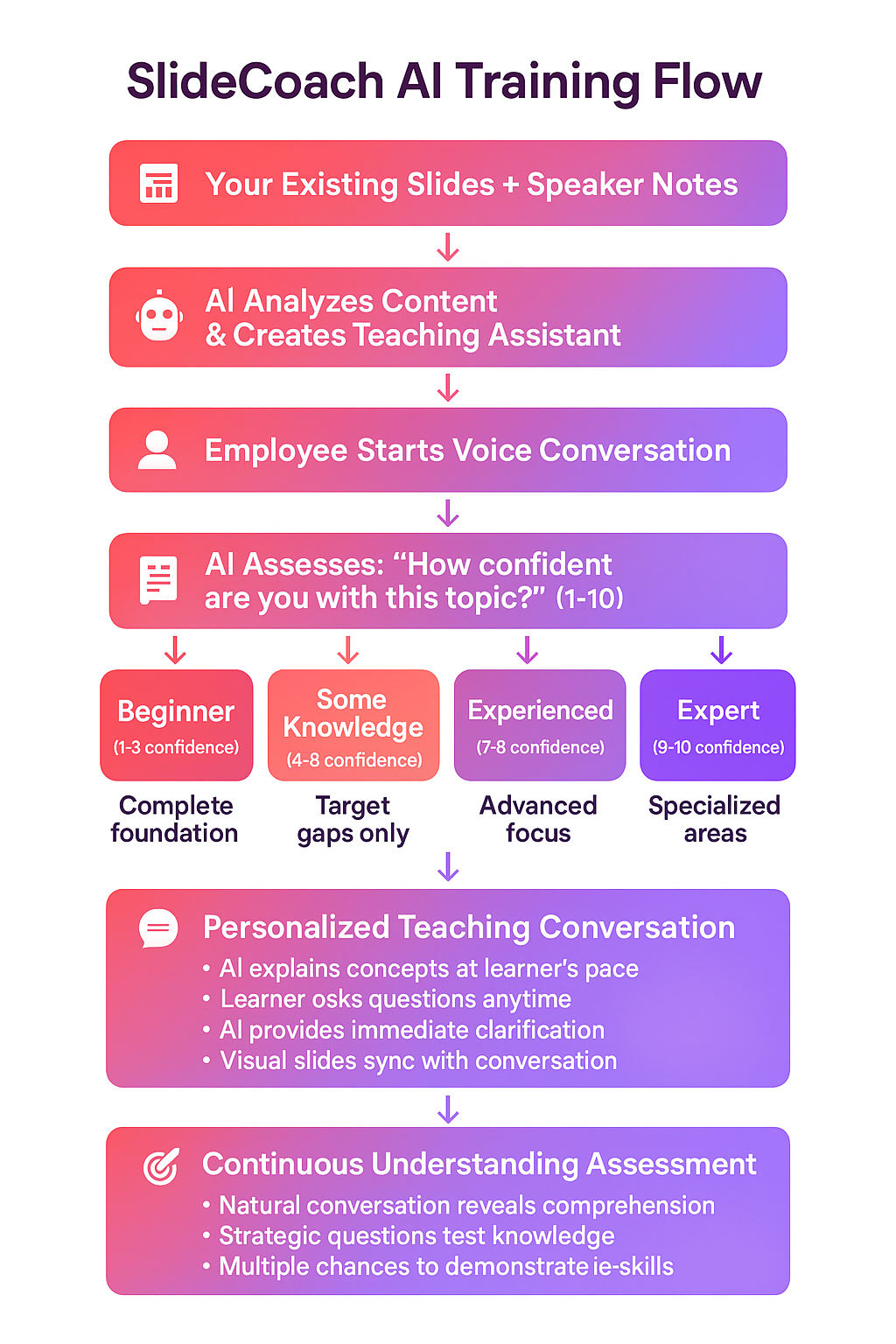
This pre-analysis becomes the AI tutor's teaching plan, but the plan isn't rigid, it's a dynamic roadmap. When the session begins, the AI's first job is to understand the learner's starting point. It will ask a few initial questions to gauge their existing expertise and identify specific knowledge gaps.
For our sandwich example, it might start with: "Hi there! Before we begin, on a scale of 1 to 10, how confident are you about making a peanut butter and jelly sandwich?"
Based on the answer, it customizes the entire experience. A beginner who answers "2" will get a careful, step-by-step walkthrough of the basics. An experienced user who says "8" might skip straight to discussing common mistakes or advanced techniques. This initial diagnosis allows the AI to focus only on what the learner needs, transforming a one-size-fits-all lesson into a bespoke tutoring session.
With this personalized path established, the AI then begins its core mission: to validate that the learner has mastered the skills of "Following Recipe Steps" and "Understanding Ingredients." It weaves the essential questions from its plan into the natural flow of conversation, listens for evidence of understanding, and only marks a skill as "achieved" when the learner has proven their competency.
This automated backend is what allows the system to scale, transforming any slide deck into an intelligent, skills-focused curriculum. But as I moved from this elegant design to robust testing, I hit the wall.
Under the Hood: How the AI Tutor Orchestrates a Session
To appreciate the challenges, it's important to understand what the AI agent is actually doing behind the scenes. It's not just a chatbot with access to a document; it's an orchestrator running a complex sequence of operations. The entire intelligent experience is powered by the agent's ability to use "tools."
The Session Startup Protocol
Before the AI even says "hello," it has to prepare for class. The moment a learner begins a session, the agent kicks off a critical setup sequence:
- get_all_slide_content(): This is the first and most important action. The agent makes a comprehensive call to download its entire "brain" for the session. It receives a structured payload containing the content for every slide, the detailed speaker notes, the specific skills mapped to each slide, and the essential questions it needs to ask to gauge understanding. This is how the AI gets its complete teaching plan.
- start_teaching_session(): Immediately after getting its instructions, the agent calls this tool to initialize the session in the database, which allows it to begin tracking the learner's progress.
The "Listen, Think, Act" Loop
Once the session is live, the AI operates in a continuous loop. It listens to the learner, thinks about the next logical step based on its teaching plan, and then acts by using its tools. These actions are what make it more than just a conversationalist.
Here are the key tools it uses during the conversation:
- set_current_slide(slide_number): This tool is the AI's hands, allowing it to control what the learner sees. When the tutor says, "Let me show you the main dashboard on slide 3," it’s simultaneously calling this function to change the slide in the user's browser.
- update_skill_mastery(skill_id, confidence_score, evidence): This is the core assessment tool. When a learner demonstrates understanding, the AI calls this function to formally record the achievement. It passes the specific skill ID, a confidence score it calculated (e.g., 90%), and the text from the user's response as evidence. This is what moves learning from a conversation to a measurable outcome.
- search_knowledge_base(query): This tool gives the AI the ability to handle the unexpected. If a learner asks an off-script question, the agent uses this to search the RAG database for relevant information before formulating an answer.
This sophisticated orchestration is the magic behind the vision, a system that can guide, assess, and react in real-time.
Where the Technology Stands in September 2025
The blueprint for the AI tutor felt like magic, and in many ways, it is. The design is an intelligent, automated system for creating the perfect learning experience. But when I tried to bring that magic to life through rigorous testing, I discovered that the technology, as of September 2025, still has some very real, very frustrating limitations that prevent a truly seamless experience.
1. The "Flow-State Killer": Conversational Latency
The biggest and most immediate problem was the conversational flow. I discovered unnatural pauses—2 to 4 seconds of dead air that made the interaction feel clunky and robotic.
The source of this friction is the very orchestration I detailed in the last section. While each individual tool call is fast, the AI often needs to chain them together to complete a single thought. For example, after a user answers a question, the AI has to:
- Process the answer. (Pause)
- Call update_skill_mastery() to flag understanding. (Pause)
- Decide the next logical step is to move to a new topic.
- Call set_current_slide() to bring up the new visual. (Pause)
- Finally, generate and speak its next sentence.
That sequence of operations adds up, creating the jarring delay that breaks the natural rhythm of a conversation and pulls the learner out of their flow state. Plus ElevenLabs voice agents are setup more for support chats and not real-time tutors meaning they like to pause and wait for a user to respond between slides no matter how I prompt it.
2. The Unforgiving Audio Environment
In a quiet home office, voice AI is amazing. But our employees don't work in soundproof booths. I discovered that the AI's "ears" are incredibly sensitive to the real world. A humming air conditioner, a TV playing in the background, or a family member talking nearby could completely derail a session. The AI would misinterpret the background noise as a response or get confused and stop listening. Unlike text-based tools that can be used anywhere, my voice-first AI tutor demanded a controlled, quiet environment, a significant barrier for employees working from home or in a busy office.
3. The Consistency Conundrum
Enterprise training has to be reliable and predictable. Unfortunately, even the best models today have moments of strange behavior. I saw my AI tutor occasionally:
- Subtly change its persona mid-conversation.
- Hallucinate a feature that the company's technology doesn't have.
- Get stuck in a conversational loop, asking the same clarifying question repeatedly.
For a creative tool, this can be a charming quirk. For a compliance or technical trainer, it’s a critical failure. I realized you can't have an AI giving even slightly incorrect or inconsistent information.
4. The "Goldfish Memory" Problem
True personalized learning requires the tutor to remember the entire conversation. It needs to recall that you struggled with a concept 10 minutes ago and circle back to it. While today's models have increasingly large context windows (their short-term memory), they still struggle to maintain perfect, long-term recall across an entire training module without sophisticated, and often slow, workarounds. My AI would sometimes forget key details shared by the user earlier in the session, breaking the personalized thread. I need to build RAG memory on the fly during the conversation and call it each time.
5. The Unpredictable Cost at Scale
The "pay-per-token" model of most powerful LLMs is a blessing for experimentation but a challenge for budgeting at scale. A 30-minute interactive conversation generates a massive number of tokens. When I modeled the cost of deploying this to 100% of the employees, the projected expense was not only high but also wildly unpredictable, varying based on how "chatty" each employee was.
The Lessons Learned and My 3-Month Watchlist
My initial goal was ambitious, but the experiment was far from a failure. The key lesson is to distinguish between what is possible in a demo and what is practical and reliable enough for an enterprise setting.
So, I'm pressing pause, but I'm not giving up. The AI space moves at lightning speed. Here is what I’ll be watching for over the next three months. If I see significant progress in these areas, I'll be ready to restart.
- Reduced Model Latency: I'm looking for new models or inference techniques that bring down the "tool-calling" and response-generation delays to under a second, making conversation feel natural.
- Improved Reliability and "Steerability": I need models that are less prone to persona drift and can follow complex instructional logic with near-perfect consistency.
- Larger and More Efficient Context Windows: The ability to hold an entire training session's worth of conversation in active memory without performance degradation or massive cost is a game-changer.
- More Predictable Cost Models: I'll be watching for new pricing structures or more efficient models that make scaling a tool like this financially viable.
The dream of a personal AI tutor for every employee is not dead, it's just waiting for the next generation of technology to fully catch up. I'm betting that by early 2026, the landscape will look very different.




Member discussion